Operations AI Strategy: A Practical 2026 Guide
Last year I watched a “successful” AI pilot die in the space between two meetings. The demo was slick, the model worked, and yet… nobody changed their day. The issue wasn’t the algorithm—it was the absence of an Operations AI Strategy: no owner, no workflow integration, no governance, and no agreed definition of “better.” This guide is the playbook I wish we’d had: practical, a little opinionated, and designed to get measurable business outcomes KPIs within 90 days (not someday).
1) Business Alignment First (the unsexy part that saves you)
When I build an operations AI strategy, I start with business outcomes, not models. It’s tempting to ask, “Should we use an agent or RAG?” but the better first question is, “What KPI must move?” Revenue, cost reduction, cycle time, quality, and customer outcomes are the scoreboard. If we can’t name the scoreboard, we can’t claim a win.
Start with KPIs, then work backward
I write a one-page definition of done and tape it to my monitor (yes, really). It keeps me honest when the project gets noisy.
- Outcome KPI: e.g., reduce order-to-ship cycle time by 15%
- Operational KPI: e.g., cut “waiting for approval” time from 2 days to 6 hours
- Quality guardrails: error rate, rework rate, compliance checks
- Customer impact: fewer escalations, higher CSAT, faster resolution
- Constraints: budget, data access, security, change capacity
Map AI to real operational moments
AI value shows up in the messy parts of operations: handoffs, queues, exception handling, and approvals. I literally walk the process and mark “decision points” and “waiting points.” That’s where AI can summarize, classify, route, pre-fill, or flag risk—without pretending the whole workflow needs to be rebuilt.
| Operational moment | AI opportunity |
|---|---|
| Handoff between teams | Auto-summary + next-step checklist |
| Queue backlog | Priority scoring + smart routing |
| Exceptions | Pattern detection + suggested resolution |
| Approvals | Policy checks + draft approval notes |
Mini-tangent: innovation theater
“Innovation theater” feels great for a week: demos, prompts, shiny dashboards. Then Q3 reviews arrive and someone asks, “What changed?” If the answer is vague, trust drops fast.
Baseline first, prompts later
Before I touch a prompt or pipeline, I capture baseline metrics: current cycle time, cost per case, defect rate, and throughput. Future me always thanks present me, because without a baseline, improvement is just a story.

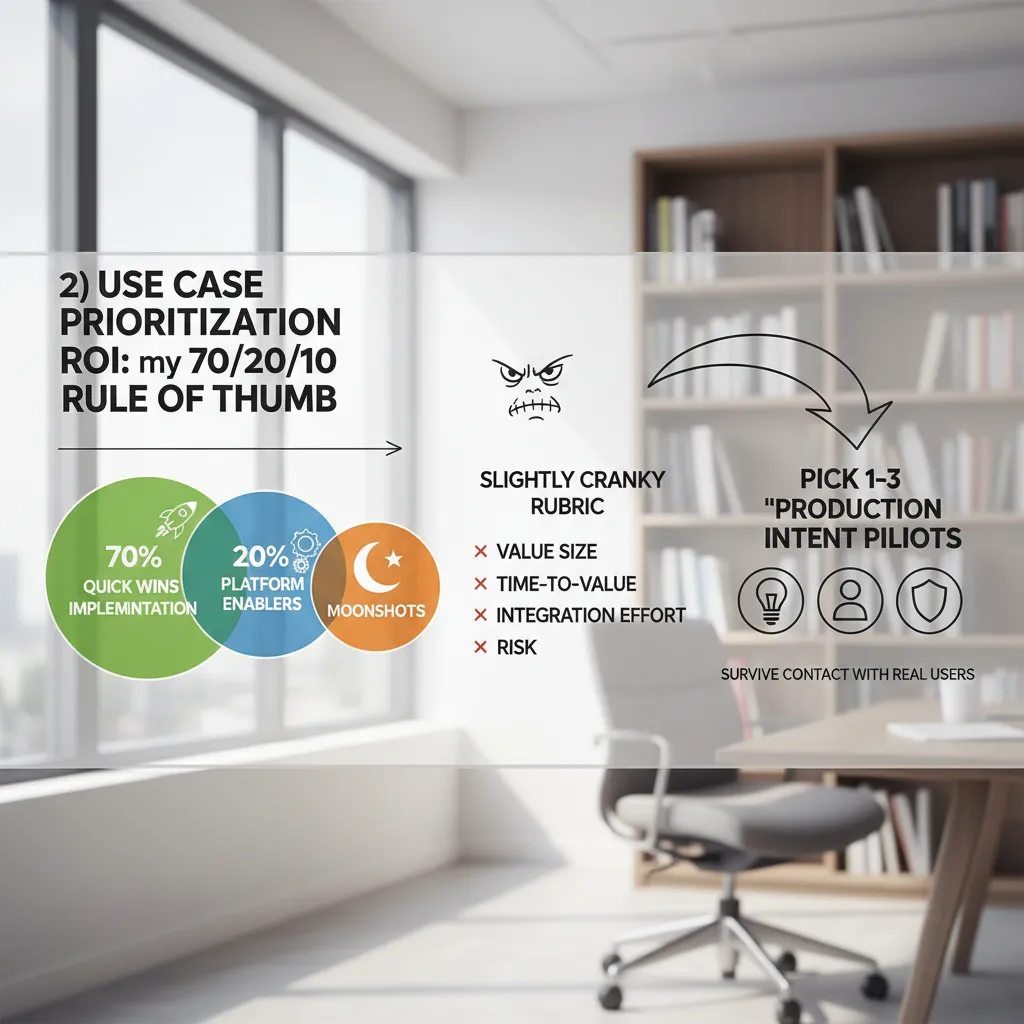
2) Use Case Prioritization ROI: my 70/20/10 rule of thumb
When I build an Operations AI strategy, I don’t start with a single “hero” idea. I build a portfolio. Otherwise you get a pet project that looks great in a demo and dies in production. My rule of thumb is simple: 70/20/10.
- 70% quick wins: proven use cases with clear owners and fast implementation.
- 20% platform enablers: data, integration, governance, and workflow plumbing that makes many use cases cheaper later.
- 10% moonshots: high-upside bets, tightly scoped, with explicit stop rules.
My slightly cranky ROI rubric
I score “ROI use cases” with a rubric that forces trade-offs. I keep it blunt so teams can’t hide behind hype.
| Factor | What I ask |
|---|---|
| Value size | Does it move cost, revenue, risk, or customer experience in a measurable way? |
| Time-to-value | Can we ship something useful in weeks, not quarters? |
| Integration effort | How many systems, teams, and approvals are in the critical path? |
| Risk | What breaks if the model is wrong—money, compliance, safety, trust? |
Pick 1–3 “production intent pilots”
I only greenlight 1–3 pilots at a time, and they must be production intent: real users, real data, real SLAs, and a path to support. If it can’t survive contact with operations, it’s not a pilot—it’s a prototype.
Prioritize cycle-time compression
The fastest ROI usually comes from cycle-time compression: remove handoffs, automate exception triage, and cut rework loops. I look for queues, approvals, and “swivel-chair” steps where people copy-paste between tools.
If my CEO demanded savings in 90 days
“Show me savings in 90 days.”
- AI-assisted invoice and PO exception triage with clear routing rules.
- Customer support deflection for top intents + agent assist for the rest.
- Maintenance work order summarization and parts lookup to reduce technician admin time.
- Ops reporting automation: daily KPI narratives from existing dashboards.
3) Data Foundation Strategy (because “the data is messy” is not a plan)
In every Operations AI Strategy I’ve helped with, the same blocker shows up fast: data. Not “we don’t have data,” but we have data and it’s chaotic. So I define data platform readiness upfront, before we pick models or vendors. I look at four basics: quality (is it usable), accessibility (can we get it safely), integration paths (how it moves between systems), and ownership (who is accountable when it breaks).
Name the ugly data truths, then triage
I don’t sugarcoat what I find. Common “ugly truths” in operations data include:
- Duplicate customers across ERP and CRM
- Missing timestamps on work orders or scans
- Inconsistent part numbers (same item, different codes)
- Free-text fields used as a dumping ground
Then I triage: what blocks the pilot, what risks bad decisions, and what can wait. The goal is not to clean everything. The goal is to clean the right things.
Set “minimum viable data” for pilots with production intent
For AI pilots that are meant to go live, I set a minimum viable data standard. It’s a short checklist that says: “If we can’t meet this, we pause.” Example:
- Key IDs are stable (customer, asset, part, location)
- Critical events have timestamps
- Coverage is above an agreed threshold (like 90%)
- Data refresh is defined (daily, hourly, real-time)
Decide where truth lives (and how conflicts get resolved)
I also decide where the “system of record” is: ERP vs CRM vs data warehouse. When ERP says one thing and CRM says another, we need rules. I document them in plain language and make them owned.
Small confession: I once tried to “fix data later.” It became a year-long hobby.
4) AI Governance Framework: guardrails that don’t kill momentum
In my operations AI strategy work, I treat governance like an operations manual, not a policy binder. The goal is speed with control: who approves what, how fast, and what “no” looks like. If people can’t find the rules in five minutes, they will route around them.
Write governance like an ops manual
I document a simple approval map tied to risk level. Each AI use case gets an owner, a backup, and a clear decision window.
- Low risk (internal summaries, draft emails): team lead approves in 24–48 hours.
- Medium risk (customer-facing text, workflow automation): ops + security review in 5 business days.
- High risk (pricing, credit, hiring, regulated decisions): formal review, testing evidence, and sign-off before launch.
“No” is also defined: no PII in public tools, no unapproved vendors, no models that can’t be audited, and no automation without a rollback plan.
Cover risk management and compliance early
I pull privacy, security, and audit needs into the first design doc, not the final checklist. My baseline controls include:
- Privacy: data minimization, retention limits, and redaction rules.
- Security: access control, secrets handling, and logging.
- Auditability: prompts, versions, and decisions traceable to a ticket.
- Vendor risk: SOC2/ISO evidence, data usage terms, exit plan.
- Model drift: monitoring for quality drop, bias, and changing inputs.
Lightweight review loops that keep teams moving
- Weekly: review flagged items (bad outputs, near-misses, user complaints).
- Monthly: track metrics (accuracy, cycle time saved, cost, incidents, adoption).
- Quarterly: major updates (model changes, new data sources, vendor renewals).
Define “acceptable failure” for pilots
For pilots, I write down what failure is allowed: limited scope, capped users, human review, and a clear stop button. When teams know they won’t be punished for reporting issues, they surface problems early instead of hiding them.
Governance gets easier when you treat it like safety equipment, not a courtroom.
5) Operating Model Skills: who owns the AI worker on Tuesday morning?
In 2026, the fastest Operations AI programs I see are the ones that answer a simple question: who owns the AI worker on Tuesday morning when something changes, breaks, or needs a new task? If ownership is unclear, adoption stalls and risk goes up.
Adopt a business-led deployment model
I recommend a business-led model where a business product owner is accountable for outcomes (cycle time, quality, cost), while IT and Security partner on platforms, access, and controls. This keeps AI tied to real work, not demos.
- Business product owner: defines use cases, success metrics, and process changes.
- IT: enables tools, integrations, monitoring, and reliability.
- Security/Compliance: sets guardrails, reviews data use, and approves risk controls.
Stand up an AI CoE that enables (not a ticket queue)
From “The Complete Operations AI Strategy Guideundefined,” the best AI Center of Excellence is an enablement team. I keep it small and focused on teaching, templates, and unblocking teams—without becoming the place every request goes to die.
- Reusable prompt patterns, evaluation checklists, and SOP templates
- Office hours and rapid reviews for new AI workflows
- Reference architectures for approved tools and data paths
Plan AI literacy upskilling by role
AI literacy is not one training. I plan role-based learning so each group knows what “good” looks like in their day-to-day.
- Managers: set goals, manage change, and measure time saved.
- Analysts: validate outputs, handle exceptions, and improve prompts.
- Frontline teams: use AI checklists, copilots, and escalation rules.
Make adoption real (and safe)
I bake AI usage into goals by recognizing time savings and quality gains. I also address the fear directly: “AI will replace me.” I say the quiet part out loud—AI replaces tasks, and we will reskill people for higher-value work.
The first time a supervisor showed their team an AI-assisted checklist, adoption doubled overnight.

6) Integration Business Operations: where value finally shows up
In my experience, an Operations AI Strategy only becomes “real” when it is integrated into day-to-day business operations. Demos are easy. Value shows up when AI helps a real workflow move faster, with fewer errors, and with clear ownership.
Design Flow Work first (then place AI carefully)
I start by mapping the workflow end to end: trigger, steps, handoffs, systems, and outcomes. Then I decide where AI slots in—and where it absolutely shouldn’t. If a step is high-risk, regulated, or needs strict judgment, I keep AI in a support role (drafting, summarizing, suggesting) and require a human decision.
Engineer for workflow automation integration
Integration is not “add a chatbot.” It’s building reliable connections: APIs, orchestration, and human-in-the-loop checkpoints. I like to define three lanes:
- Auto: safe actions AI can execute (e.g., create a ticket).
- Assist: AI proposes, a human approves (e.g., vendor email draft).
- Advise: AI only informs (e.g., risk flags, summaries).
Embed tools where people already live
Adoption improves when AI shows up inside email, chat, CRM, and calendars. I aim to reduce context switching: one click from a Slack thread to a CRM update, or an email summary that links to the right record. If users must open a new tool, log in again, and copy/paste data, the project usually stalls.
My “integration done” checklist
- Logging of prompts, actions, and outcomes
- Monitoring for failures, drift, and latency
- Rollback plan (feature flags, safe fallbacks)
- Permissions aligned to roles and least privilege
- Audit trail for who approved what, and when
Quick Wins Platform: ship in 30–45 days
I push for one small release that touches a real system like ERP/CRM in 30–45 days. Example: AI reads inbound requests, classifies them, drafts a response, and creates the correct CRM case with required fields. That single integration proves the Operations AI Strategy can deliver measurable cycle-time and quality gains.
Conclusion: My 90-day implementation plan (and the question I ask myself)
When I step back from this Operations AI Strategy: A Practical 2026 Guide, I keep coming back to five simple pillars. First is alignment: I make sure leaders and frontline teams agree on the problem and the goal. Second is ROI use cases: I pick a few high-value workflows where AI can save time, reduce errors, or speed decisions. Third is data: I confirm the inputs are available, clean enough, and owned by someone who can fix them. Fourth is governance: I set rules for access, privacy, model changes, and escalation when something looks wrong. Fifth is the operating model + integration: I decide who runs it day to day and how it fits into the tools people already use.
My 90-day plan is straightforward. In weeks 1–2, I align on outcomes, map the current process, and capture baselines like cycle time, rework, and cost per transaction. I also define what “good” looks like and what risks we will not accept. In weeks 3–6, I build the smallest useful solution, connect it to real systems, and test it with real users in real shifts. I focus on one or two workflows, not ten. In weeks 7–12, I run improvement loops: weekly reviews, error analysis, prompt and policy updates, training refreshers, and a clear path for feedback from the floor.
What I’d do differently next time is simple: I would run fewer pilots, assign clearer ownership earlier, and put governance in place before the tool spreads. In operations, “almost ready” becomes “in production” fast.
I also use a wild-card analogy: I treat AI like a new shift supervisor—great when trained, dangerous when unsupervised. It needs coaching, guardrails, and accountability.
Where will this live in the workflow on Tuesday at 10:17am?
If I can’t answer that, I’m not building an Operations AI strategy—I’m just experimenting.
TL;DR: Build an Operations AI Strategy around five pillars: business alignment, ROI use cases, data/platform readiness, AI governance framework, and operating model skills + MLOps/security. Aim for a 70/20/10 portfolio, deliver 90-day quick wins, embed AI into existing tools, and run weekly/monthly/quarterly improvement cycles to scale.


Comments
Post a Comment