AI Sales Integration: A Step-by-Step Playbook

The first time I “added AI” to a sales workflow, I did it the lazy way: I bought a shiny tool, connected it to the CRM, and assumed the pipeline would magically fatten overnight. What happened instead was… silence. Reps ignored it, managers didn’t trust it, and I learned (the hard way) that AI integration isn’t a switch—it’s a sequence. In this guide, I’m walking through the step-by-step approach I wish I’d followed: map the sales process, pick high-impact areas, set clear objectives, run pilot testing, and then scale—while keeping real humans in the loop.
1) Before Tools: Map the Sales Process (Warts and All)
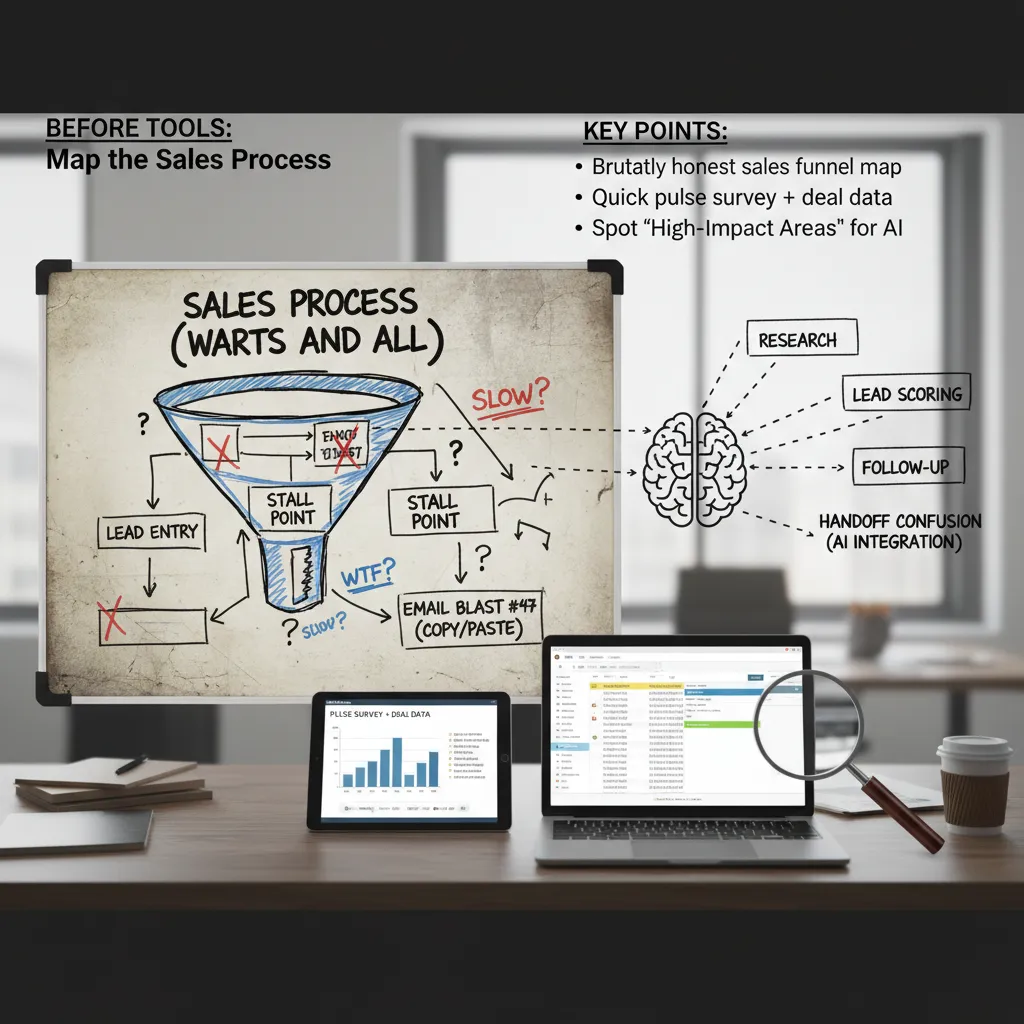
Before I touch any AI sales tool, I map the sales process exactly as it runs today—not how we wish it ran. I want a brutally honest view of the funnel: where leads enter, where they stall, and where reps copy-paste the same email for the 47th time. This step sounds basic, but it’s the difference between “AI that helps” and “AI that adds noise.”
Start with a real funnel map (not a slide)
I sketch the journey from first touch to closed-won and include every handoff. Then I mark friction points in plain language: “waiting on pricing,” “no next step,” “demo scheduled but no prep,” “lead went cold.” If I can’t explain a stage in one sentence, it’s usually a sign the stage is doing too much.
Pulse survey + deal data (feelings, then facts)
I run a quick pulse survey with the team. I ask:
- What part of your day feels slow?
- Where do deals get stuck most often?
- What do you repeat over and over?
Then I verify it with CRM timestamps and activity logs. I’ve learned to trust the data more than my hunches. If reps say “follow-up is fine,” but the CRM shows a 9-day gap after demos, I treat the gap as the truth.
Find high-impact areas for AI integration
Once the map is honest, I look for the best “AI leverage” spots—places where small automation creates big lift:
- Research time: account summaries, competitor notes, call prep
- Lead scoring: prioritizing who gets attention first
- Follow-up gaps: reminders, draft emails, next-step prompts
- Handoff confusion: mismatches between marketing automation and sales stages
Tiny tangent: clean your CRM “junk drawer” first
If your CRM fields look like a junk drawer—random picklists, missing owners, “N/A” everywhere—fix that first. AI will confidently learn your chaos. I standardize key fields (stage, source, next step, close date) and remove duplicates so the system has something real to learn from.
2) Clear Objectives I Can Actually Measure (Not ‘Do More With Less’)
When I implement AI in sales, I start by writing 2–3 objectives max. Anything longer turns into a wish list, and a wish list becomes nobody’s job. The point of an AI sales integration playbook is focus: one quarter, a few outcomes, clear numbers.
My 2–3 measurable objectives (examples)
- Increase qualified lead volume by 30% (not “more leads”). I define “qualified” using our existing rules (ICP fit + intent signal + minimum data completeness).
- Cut rep research time by 50% by using AI for account summaries, contact discovery, and call prep notes—measured in time tracked per opportunity.
- Shorten sales cycle time (for example, from 45 days to 35) by improving follow-up speed and next-step clarity after calls.
I don’t pick all three unless they truly matter this quarter. If leadership cares most about pipeline, I prioritize lead volume and speed-to-lead. If the team is overwhelmed, I prioritize research time reduction.
I sanity-check every objective against the buyer journey
Before I lock anything in, I ask: are we improving the buyer experience, or just generating more noise? I map each objective to a stage:
- Awareness: faster response time to inbound leads, better routing, fewer missed handoffs.
- Consideration: stronger prospect interactions—more relevant outreach, better discovery questions, cleaner follow-ups.
- Decision: fewer stalled deals—clear next steps, faster proposal turnaround, better risk flags.
“If the metric doesn’t change buyer outcomes, it’s probably a vanity goal.”
Wild card test: if AI went down for a week…
I run a simple thought experiment: if AI went offline for seven days, what metric would I miss first? Speed-to-lead? Research time? Meeting-to-next-step conversion? That “first pain” is usually my real objective—and the best place to start implementing AI in sales with measurable impact.
3) Choosing the Right Sales AI Tools (My ‘Boring’ Checklist)
I’ve learned the hard way that the right tools beat flashy demos. A smooth demo can hide messy setup, low adoption, and reports that don’t match how we measure success. So I start with a simple order of checks: CRM integration first, then usability, then reporting.
My “boring” order of operations
- CRM integration: If it can’t write clean data back to our CRM (contacts, activities, notes), it’s a no. AI in sales only works when it fits the system of record.
- Usability: Reps won’t use a tool that adds clicks. I look for workflows that feel natural inside the daily routine.
- Reporting tied to our metrics: I want dashboards that map to our success metrics (reply rate, meetings booked, pipeline created, forecast accuracy), not vanity charts.
I separate tools by the job-to-be-done
When people say “AI sales tools,” they often mix very different needs. I group options like this:
- AI prospecting: research + personalization (account insights, role-based messaging, firmographic notes).
- Sales engagement: sequencing and follow-ups (email steps, call tasks, timing suggestions).
- Sales analytics: forecast + coaching (pipeline risk, deal health, call summaries, next-step prompts).
- AI agents for admin tasks: logging activities, drafting recap emails, updating fields, creating tasks.
The uncomfortable question: “What’s the failure mode?”
Before we buy anything, I ask: How does this tool fail, and how will we notice? Common failure modes include:
- Wrong lead scoring that pushes reps toward low-fit accounts.
- Tone-deaf automated follow-ups that hurt trust.
- Hallucinated company facts that create embarrassing outreach.
“If the tool is wrong, will it fail loudly—or quietly?”
Mini anecdote: the tool that “saved” us the most time wasn’t the smartest. It was the one reps could learn in 30 minutes, because adoption beat complexity every time.

4) Implementation Strategy: Phased Approach + Pilot Testing (Where Momentum Comes From)
When I implement AI in sales, I start with pilot testing instead of a big-bang rollout. I pick one team or one segment first—ideally a group that’s curious but skeptical. They ask better questions, spot weak points faster, and give feedback I can actually use. This mirrors the step-by-step approach in “How to Implement AI in Sales,” where small wins build trust and adoption.
Pilot First: One Team, Clear Rules
In the pilot, I keep the scope tight: one workflow, one tool, and a short timeline. I also set a simple baseline so we can compare results without guessing.
- Who: one sales pod, region, or SDR team
- What: one use case (like call notes or lead scoring)
- How long: 2–4 weeks, with weekly check-ins
My Phased Rollout (So AI Earns Its Place)
I don’t jump straight to “AI runs outreach.” I use a phased approach that reduces risk and keeps the team confident.
- Phase 1: Automate admin (CRM updates, meeting notes, follow-up reminders)
- Phase 2: Improve lead generation (lead scoring, account insights, list building)
- Phase 3: Optimize multi-channel engagement (email + LinkedIn + call support, timing, personalization)
The Early Metric I Watch: Time-to-Value
Early on, I track time-to-value: how quickly the team feels a real benefit (time saved, more meetings, cleaner CRM). Research suggests phased rollouts drive 27% faster time-to-value and 63% higher user satisfaction. Those numbers are hard to ignore, and they match what I see in practice.
A/B Testing: Let Conversion Rates Decide
I keep an A/B testing habit: new AI messaging vs. a human baseline, with conversion rates as the referee. If AI wins, we scale. If it loses, we revise prompts, data inputs, or targeting.
My rule: AI must prove value in a pilot before it earns a wider rollout.
5) Integration Plan: CRM Integration + Marketing Automation Without Breaking Everything
My Integration Plan starts with one rule: the CRM remains the system of record, even if AI writes half the notes. If I let data live “somewhere else,” reporting breaks, handoffs get messy, and the team stops trusting the numbers. So I treat AI as a layer on top of the CRM—not a replacement.
Map the data flows before I connect anything
Before I turn on any AI sales integration, I draw a simple map of what moves where. I focus on three streams:
- Lead source from marketing automation (forms, ads, webinars) into the CRM.
- Engagement touches from sales engagement tools (emails, calls, meetings) into the CRM activity timeline.
- Outcomes back into sales analytics (stage changes, pipeline, closed-won/lost, reasons).
I also decide which system “owns” each field. For example, marketing automation can suggest a lifecycle stage, but the CRM owns opportunity stage and forecast fields.
Set guardrails so AI doesn’t create risk
AI can move fast, so I define clear rules for prospect interactions and data handling:
- Auto-logged: meeting summaries, call outcomes, email opens/clicks, and basic activity metadata.
- Needs human approval: AI-written follow-up emails, pricing language, contract terms, and any message that could be seen as a promise.
- Never leaves the system: PII and sensitive notes (health, finance, legal details, internal deal strategy).
My goal is simple: AI helps with speed, but humans stay responsible for accuracy and trust.
The unglamorous part: naming conventions
A slightly unglamorous aside: naming conventions. If your stages are “New-New” and “Newer”, AI will not save you. I standardize:
- Lifecycle stages (Lead → MQL → SQL → Opportunity)
- Opportunity stages with clear exit criteria
- Activity types (Call, Demo, Follow-up, Proposal)
Once the CRM is clean, marketing automation and AI sales tools can sync reliably—and my team can actually trust the dashboard.

6) Training Onboarding + Change Management (The Part I Used to Skip)
I used to treat training like a checkbox: record a Loom, share the link, and hope reps “figure it out.” That approach fails with AI in sales because the tool changes daily habits—how reps research, write, and follow up. If I want real AI sales integration, I have to onboard like I’m launching a product internally.
Training isn’t a one-and-done video
My best results come from hands-on sessions where everyone uses the AI tool live. I run short drills, then we review outputs together so people learn what “good” looks like.
- Hands-on sessions: reps generate outreach, call prep, and follow-ups in real time.
- Roleplay simulations: one rep plays the buyer, one rep uses AI to prep, then we debrief.
- “Bring your worst lead” workshop: everyone brings a messy, low-quality lead and we use AI to find angles, write a first email, and plan next steps.
Set expectations: AI drafts, humans decide
I’m very clear on the rule:
AI drafts. Humans decide.
Reps can use AI to speed up research and writing, but humans own the final message—especially for tone, pricing language, and anything that could impact trust. If a line feels pushy, unclear, or risky, we rewrite it. I also give a simple checklist:
- Is it accurate for this account?
- Does it match our voice?
- Could it create confusion on price, terms, or promises?
Choose internal champions (not just top reps)
I pick a few champions to support the rollout. Surprisingly, my best teachers are often patient mid-performers. They explain steps clearly, document workflows, and help peers without ego.
Track adoption like a product team
I measure onboarding the same way I’d measure a feature launch:
- Logins and weekly active users
- Usage per rep (emails drafted, call notes summarized, research runs)
- Drop-off points in the workflow
If people drop off, I don’t blame them. I assume the workflow is the bug and fix the process, prompts, or tool setup.
7) Monitor & Optimize: Success Metrics, ROI Metrics, and the ‘Human Check’
Monitor and optimize is where AI integration either becomes normal in my sales team… or it becomes shelfware. The first few weeks are not the time to “set it and forget it.” They’re the time to watch what the tool actually changes in the real workflow, then adjust fast. This is the part of my AI sales integration playbook that turns a pilot into a habit.
Success metrics I review weekly (early on)
When I implement AI in sales, I review success metrics weekly at the start. I look at conversion rates by stage (lead to meeting, meeting to opportunity, opportunity to close) because that shows if AI is improving the journey, not just activity. I also track time saved on research, note-taking, and follow-ups, plus the meeting booked rate from outbound and inbound. Most important, I watch revenue growth signals like pipeline created and pipeline velocity—not just emails sent or tasks completed. Activity is easy to inflate; pipeline is harder to fake.
ROI metrics that keep me honest
For ROI, I compare the cost of tools, training, and admin time against measurable gains: more qualified meetings, faster cycle times, higher win rates, and increased pipeline value. If the numbers don’t move, I assume the issue is either adoption, bad prompts, poor data, or the wrong use case—and I fix that before buying more software.
The ‘human check’ (lightweight audits)
I run quick audits of AI outputs for factual accuracy, compliance, and tone. I also check if automated follow-ups are helping or quietly annoying prospects. If unsubscribe rates rise, replies get colder, or reps feel embarrassed to send messages, I treat that as a warning sign and tighten rules, templates, and review steps.
To close the loop, I keep asking reps what they’re doing with the time saved. If it’s not being reinvested into discovery, account planning, and real relationship building, we didn’t actually win—we just got faster at being busy.
TL;DR: Map your current sales process first, set clear objectives with measurable goals, pick the right sales AI tools, run pilot testing, integrate with your CRM, train the sales team, and monitor/optimize with success metrics tied to revenue growth and conversion rates.


Comments
Post a Comment