My First AI Workflow Automation (Without Losing It)

The first time I tried to automate my weekly “status update” ritual, I accidentally created a robot that emailed my own draft notes back to me… three times… at 2:07 a.m. That’s when I learned two things: (1) AI workflow automation is wildly powerful, and (2) a tiny mistake in a visual workflow builder can turn your life into a slapstick comedy. In this post I’ll walk through how I build a first workflow today—starting small, picking a tool that fits, and adding just enough guardrails that I can sleep at night.
1) The “one boring problem” rule (AI workflow automation)
My rule for AI workflow automation is simple: if a task annoys me weekly, it’s automation-worthy. A “workflow” is just a repeatable chain of steps—like sending status updates, routing new leads to the right person, or doing support triage. The goal isn’t a production-grade automation empire on day one. It’s one small win.
My litmus test: weekly annoyance = automate
I start by picking a single trigger → action chain. Example: When a form is submitted (trigger), then create a ticket and notify Slack (action). Most top tools make this feel doable because they share the same basics: a visual canvas, a drag-and-drop interface, a workflow templates library, and often an AI assistant that suggests steps.
Conditional logic nodes (IF/THEN, not scary)
I introduce Conditional logic nodes early, but I treat them like a choose-your-own-adventure: IF customer = VIP THEN route to priority queue ELSE normal queue. This is where No-code workflows shine—no heavy coding, just clear rules.
Define success in human terms
- Fewer tabs open
- Fewer copy/pastes
- Fewer late-night “oops” moments
My first workflow took about 45 minutes. Iteration is the real skill: build, run it a few times, adjust, repeat.
Mini anecdote: my 2:07 a.m. email loop
At 2:07 a.m., I replied to a client thread, then copied the same details into a doc, then into a task tool, then back into email—twice—because I couldn’t remember what I’d already logged. It was predictable: too many handoffs, no single source of truth, and a tired brain doing “manual sync.” That’s exactly the kind of boring loop automation is built to break.
“Automation succeeds when you start with a small, repeatable habit—not a moonshot process.” — Tiago Forte
| Metric | Value |
|---|---|
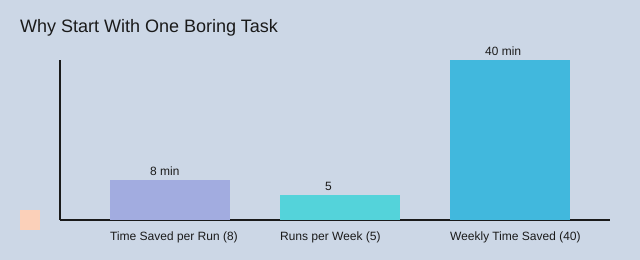
| Example time saved per run | 8 minutes |
| Runs per week | 5 |
| Weekly time saved | 40 minutes |
| Risk score (1–5) | 1 |
| Complexity score (1–5) | 1 |

2) Picking my stack: visual workflow builder vs. “I need code” days
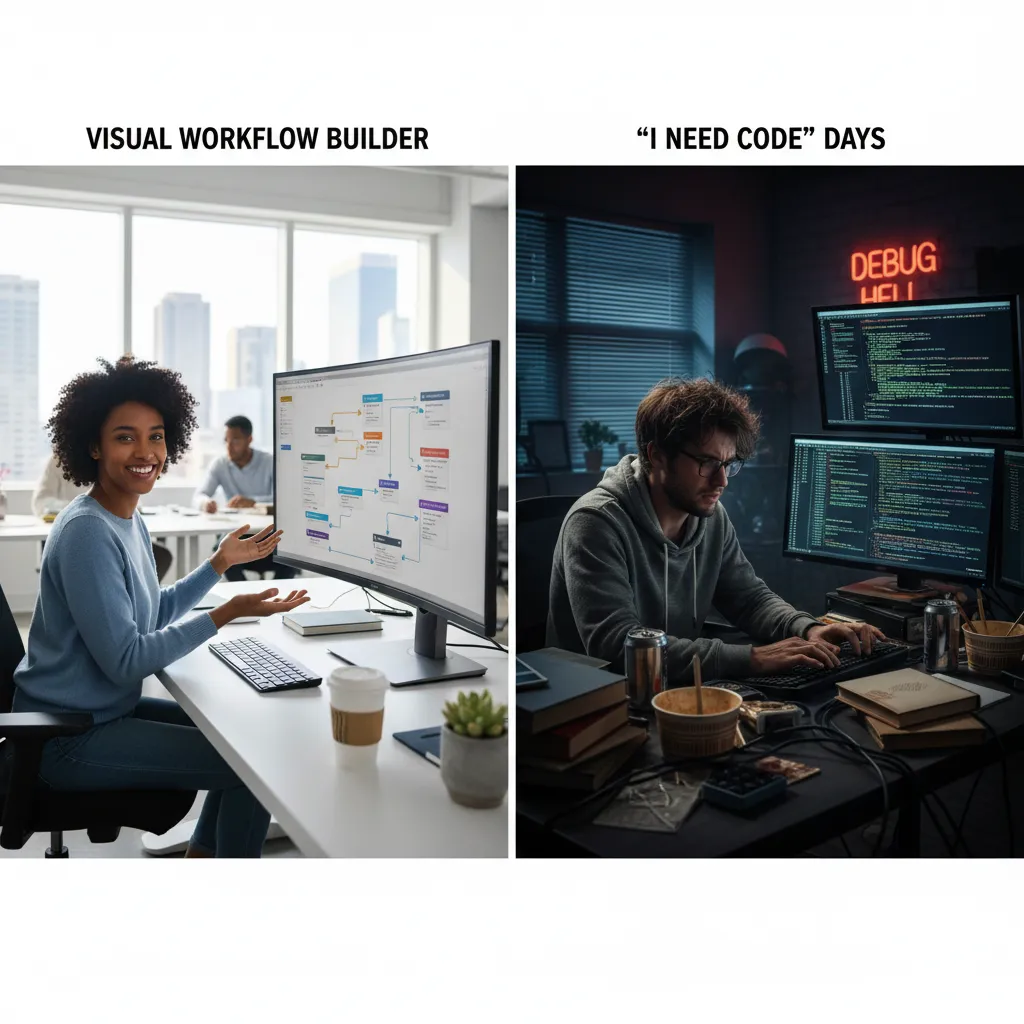
I learned fast that a Visual workflow builder is my calm place, but I still want a trapdoor into code. Bias alert: I like tools that let me peek under the hood after I get a quick win.
My quick decision tree (No-code AI workflows vs. “I need code”)
- Need speed + safety? Start with No-code AI workflows and an AI copilot.
- Need custom logic, retries, weird APIs? Pick Best low-code tools that allow code steps.
- Need enterprise controls? Look for RBAC and governance dashboards.
Tool roll call (with personality)
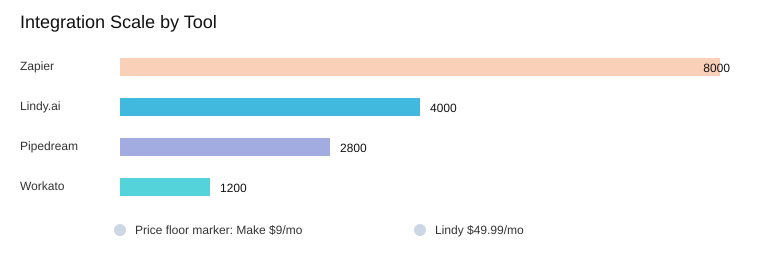
- Zapier: the friendly on-ramp—8000+ app integrations plus an AI copilot for beginner flows.
- n8n: my “I want flexibility” pick—visual builder with code steps when the workflow gets real.
- Make: budget-friendly builder (pricing starts around $9/mo) when I want lots of scenarios fast.
- Gumloop: a clean canvas with the Gummie AI assistant (and yes, used by Shopify/Instacart).
- Workato: enterprise brain—1200+ integrations, RBAC, governance dashboards, and AIRO copilot.
- Vellum AI: production-grade agentic flows with SDKs, evals, and audit governance.
- Pipedream: developer-friendly AI agent builder with natural language and 2800+ APIs via MCP.
- Lindy.ai: agent-first with 4000+ integrations (starts around $49.99/mo).
“If you can’t integrate, you don’t automate—you just move the problem.” — Andrew Ng
That quote hit me after a mistake: I once picked a tool because the UI was pretty… and regretted it when I needed Salesforce deep integration. Now I keep an Integration capabilities list as a checklist: triggers, webhooks, OAuth, rate limits, retries, and the exact apps I use.
Wild card: if I had 30 minutes to ship today
I’d choose Zapier for raw App integrations count and the copilot as an on-ramp (not magic). If I expect edge cases, I’d jump to n8n or Pipedream.
| Tool/Metric | Data |
|---|---|
| Zapier app integrations | 8000+ |
| Pipedream APIs via MCP | 2800+ |
| Workato integrations | 1200+ |
| Lindy.ai integrations | 4000+ |
| Make pricing starts | $9/mo |
| Lindy.ai pricing starts | $49.99/mo |
3) Drawing the workflow building canvas (before touching a tool)
Before I open any Visual workflow builder, I sketch a Workflow building canvas on paper. I treat it like a map I can argue with: if a step feels risky, I change the map, not the tool. Most top automation tools share the same bones—visual canvases, templates, conditional logic nodes, and AI assistants—so the thinking transfers anywhere.
My napkin method (6 nodes, max)
I draw five boxes, then add one safety box:
- Trigger (what starts it)
- Data (what I need)
- Decision (rules + confidence)
- Action (do the work)
- Notification (tell a human)
- Approval (manual gate)
Tiny aside: I name steps like 01_Trigger_NewRow because future-me forgets fast.
Where AI fits (and where it absolutely shouldn’t)
I let AI help with summarizing, classifying, and drafting (great for SEO content automation). I do not let AI approve, pay, delete, or send irreversible emails. Even with Natural language support (“create a step that drafts a brief”), I watch for hidden assumptions—like which column is “title” or what “urgent” means.
Decision routing with conditional logic nodes
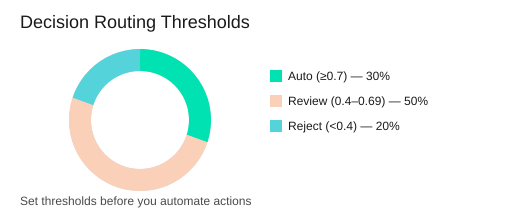
I route outputs by confidence:
- ≥ 0.7 → auto
- 0.4–0.69 → review
- < 0.4 → reject
“A workflow is a hypothesis. Testing it is the science.” — Annie Duke
My two safety rails: a dry run mode (I test 5 cases) and one manual approval step before anything public.
Example: SEO content automation draft → human edit → schedule
Trigger: new row in Google Sheets → AI drafts in Gmail/Docs → Slack pings editor → editor approves → schedule in CMS; later, I can add a CRM touchpoint (Salesforce) once the core flow is stable. I often start from a template library, then customize.
| Item | Value |
|---|---|
| Suggested nodes for first workflow | 6 |
| Approval steps recommended | 1 |
| Dry-run test cases | 5 |
| Confidence thresholds | 0.7 (auto), 0.4–0.69 (review), <0.4 (reject) |
4) Free tier pricing, paid plans, and my “don’t pay yet” bias
Free tier pricing: how I use a Free tier plan (14 days)
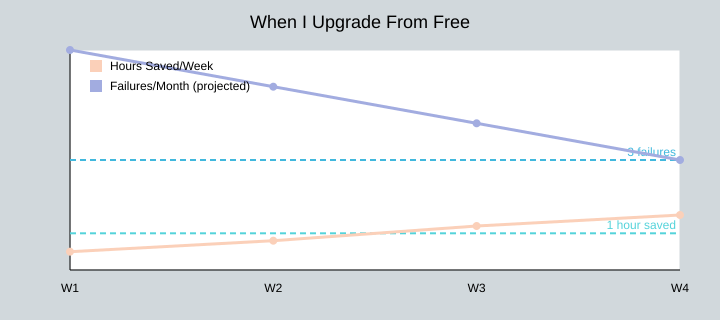
Most tools offer free tier pricing, and I treat a Free tier plan like a training ground. For the first 14 days, I learn the canvas, build one real workflow, and prove ROI. My break-even test is simple: if it saves 1 hour/week, it’s already paying me back in focus.
Pricing comparison plans: what actually changes
When I do a Pricing comparison plans check, I ignore shiny features and look at the boring limits that break automations:
- Runs/tasks per month (the hidden ceiling)
- Rate limits and concurrency
- Premium connectors (the apps you actually need)
- Logs/history length (free tiers often keep less, making debugging harder)
- Monitoring: retries, alerts, and error handling
Pricing starts monthly: the numbers I keep in my head
For SMB tools, pricing starts monthly at the low end: Make starts at $9/mo, while Lindy.ai starts at $49.99/mo. Enterprise platforms (Workato, Vellum, and others) usually go enterprise custom.
| Item | Value |
|---|---|
| Make starting price | $9/mo |
| Lindy.ai starting price | $49.99/mo |
| Suggested evaluation window | 14 days |
| Break-even threshold | 1 hour/week saved |
| Upgrade trigger | >3 critical failures/month |
My “don’t pay yet” rule: pay when failure costs money or trust
I upgrade when failures cost me real money or real trust. During a product launch, I hit a task limit and learned what rate limits means the hard way: leads stopped syncing, and I couldn’t see enough logs to fix it fast. That’s when I started paying for better history, retries, and alerts.
“The cheapest automation is the one you can trust at 3 a.m.” — Gene Kim
Enterprise pricing model: a reality check for teams
The enterprise pricing model is mostly about risk: SOC 2 compliance, SLAs, audit logs, and scalability. SMB plans focus on ease and free plans; enterprise plans focus on not breaking in production.

6) Testing like a paranoid optimist (AI test tools mindset)
When I started AI workflow automation, I learned a simple rule: assume it will fail, then help it succeed. That’s my AI test tools mindset—less “buy a tool,” more “run a checklist.” As Lisa Crispin said:
“Testing doesn’t slow you down; it prevents the kind of fast you can’t recover from.” — Lisa Crispin
My 5 tests before I trust a workflow
I run at least 5 test cases before I call anything “real,” especially for Production-grade automations and AI copilot building:
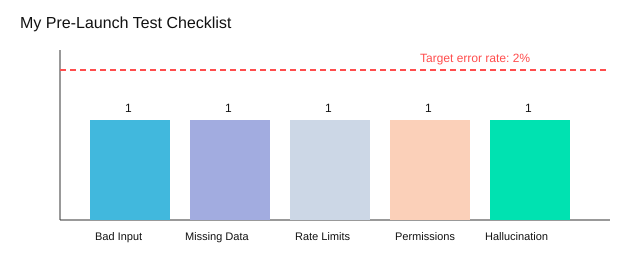
- Bad input (weird formats, empty strings, angry ALL CAPS)
- Missing data (null fields, missing IDs)
- Rate limits (API throttling; I set 3 retry attempts)
- Permissions (wrong scopes, expired tokens)
- “AI hallucination” (confident nonsense; I force citations or “unknown”)
If you’re not embarrassed by your first prompt, you didn’t test enough.
Small batches, sandbox accounts, and conditional logic
I start with a sandbox account and an initial batch size of 10 items—future-me always thanks me. If confidence is low, I use conditional logic nodes to route the case to manual review instead of letting it ship.
Logging + evaluations (so I can debug reality)
Every run captures: inputs, outputs, the model prompt, and timestamps. I also track evaluations as a concept—Vellum AI is strong here with low-code agentic flows, SDKs, evaluations, and audit governance—useful when you need repeatable checks, not vibes.
Tiny hypothetical: the workflow that replies to the CEO
Imagine my bot drafts a reply, then accidentally sends it to the CEO. My fix: permission tests + a “send” step that only runs in production after a human approval flag.
MCP functionality support also helps standardize tool connections; Pipedream’s MCP approach plus 2800+ APIs makes it easier to test the same workflow against consistent interfaces.
| Metric | Value |
|---|---|
| Test cases per workflow (minimum) | 5 |
| Initial batch size | 10 items |
| Target error rate before scaling | <2% |
| Retry attempts | 3 |
| Alerting channels | 2 (email + Slack) |
Conclusion: My “first workflow” isn’t the first one I shipped
I used to say my “first” AI workflow automation was the first one I shipped. That was wrong. My real first workflow was the first one I could debug without panicking. Shipping is easy when it works once; confidence comes when it breaks and you can fix it.
“Simplicity is the prerequisite for reliability.” — John Ousterhout
That’s why I keep coming back to the same 6-step thread: start small → pick the right builder → sketch → price wisely → govern → test. In practice, that means choosing Workflow automation tools that match your stage. SMB-friendly platforms tend to win on ease and free plans, which is perfect when you’re learning and building quick No-code workflows. Enterprise tools usually shine on governance and scalability, which matters once multiple people depend on the same automations and you need controls.
My gentle challenge: pick one task this week and automate 20% of it. Give yourself 60 minutes to build something tiny, then commit to 10 minutes a week to keep it healthy. That maintenance habit is where the “I can debug this” feeling shows up.
| Recap | Value |
|---|---|
| Steps recap count | 6 |
| Suggested first build time | 60 minutes |
| Suggested maintenance time/week | 10 minutes |
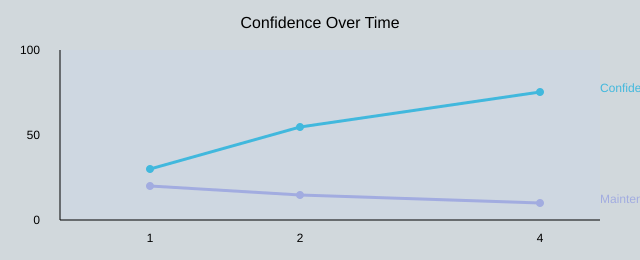
| Confidence growth timeline (weeks) | 1, 2, 4 |
Here’s what that confidence curve looked like for me:
Tool-wise, I still bounce between Zapier, n8n, Workato, Gumloop, Vellum, Pipedream, and Lindy depending on the job—and I save my best ideas as a tiny personal templates library so I’m not reinventing the same flow. Workflows are like sourdough starters: feed them, don’t abandon them. Next up, I want to share AI agent builder patterns for multi-step reasoning… unless I get distracted and automate my inbox again.
TL;DR: Start with one boring task, map inputs/outputs, build it in a visual workflow builder, test with a safe sandbox, then add governance (RBAC, audit trails, SOC 2 expectations) before you scale. Use free tier plans to learn; pay when reliability and integrations matter.


Comments
Post a Comment