Data Science Tools Compared: AI-Powered Picks

Last year I watched a perfectly good model die in a shared drive. Not because the machine learning was wrong—our predictive models were fine—but because nobody could reproduce the data preparation steps once the “one magic notebook” author went on vacation. That little incident pushed me to stop treating data science tools like shiny toys and start comparing them like I’d compare cars: reliability, maintenance, and whether they start on a cold Monday. In this post, I’m lining up AI-powered solutions and the open-source staples they often sit on top of. I’ll share what I look for (and what I’ve learned the hard way), plus a few weird-but-useful heuristics I use when a vendor demo starts to feel like a magic show.
1) My slightly chaotic rubric for data science tools
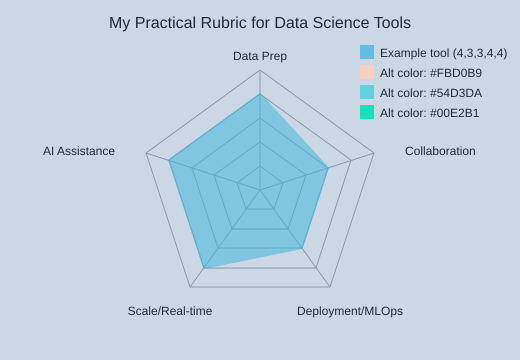
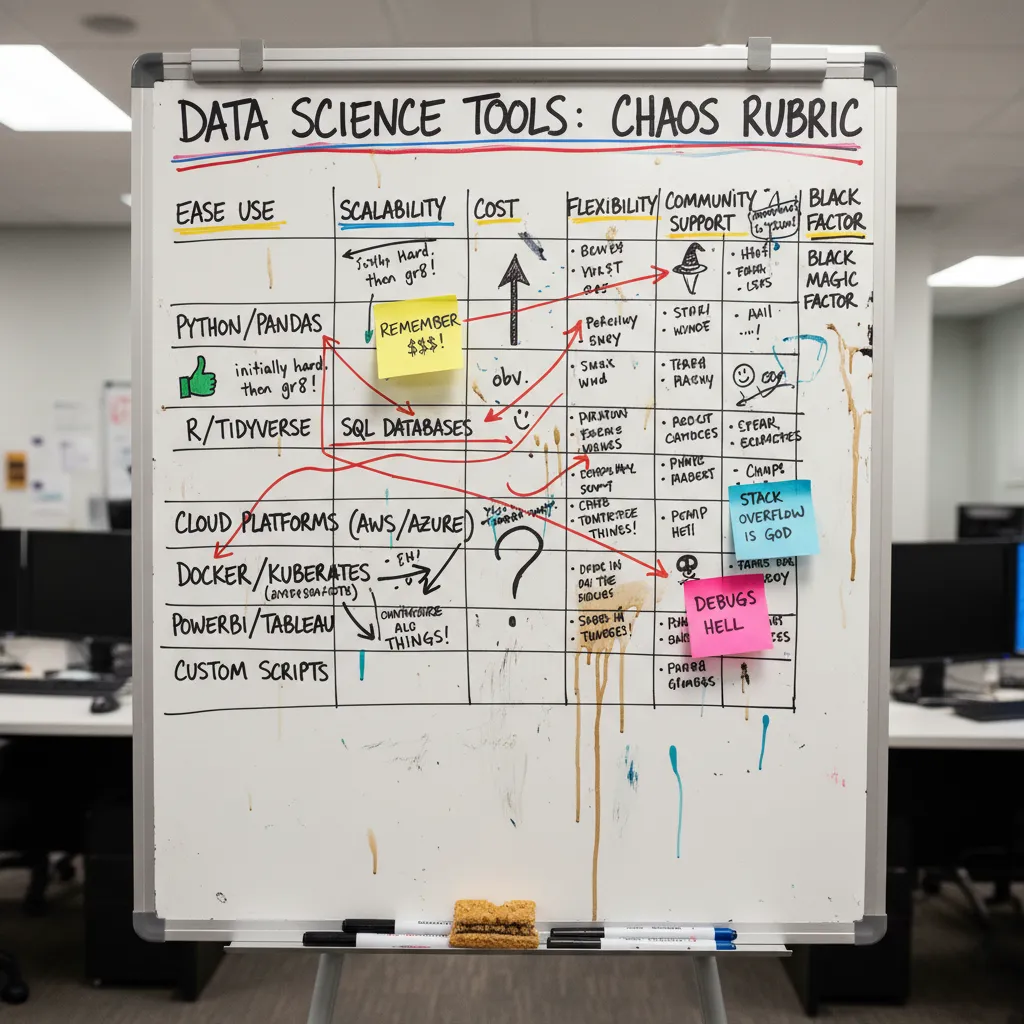
When I compare data science tools, I use a simple 1–5 scorecard. It’s “chaotic” because it’s built from real pain: messy data preparation, unclear handoffs, and surprise work right before model deployment. Demos often skip these parts, so I score what I wish they showed.
Cassie Kozyrkov: “Automation should buy you time to think, not permission to stop thinking.”
My three demo-proof criteria (plus two reality checks)
- Data preparation friction (1–5): How fast can I clean, join, and validate data without hidden steps?
- Collaboration & handoffs (1–5): Can my team review changes, track versions, and avoid “who ran this?” confusion?
- Model deployment & MLOps readiness (1–5): Are APIs, monitoring, and rollback clear, or is it all “export a notebook”?
- Scale & real-time data support (1–5): Does it handle bigger data analytics workloads and streaming needs?
- AI assistance (1–5): Does AI speed work without hiding the logic?
The “Monday test” for reproducible data analytics
My quick check: Can I rerun last week’s pipeline without Slack archaeology? AI-powered platforms often accelerate repetitive steps like data preparation and model automation, but long-term success still depends on reproducible workflows, governance, and deployment discipline—especially once you bring in mlops tools.
Where AI helps (and where it can hide problems)
- AutoML: Great for baselines; risky if it masks leakage or weak validation.
- Guided feature engineering: Helpful hints, but I want to see the exact transforms.
- NLG summaries: Nice for stakeholders, yet not a substitute for metrics and tests.
Tiny confession: I’ll forgive a lot if the tool makes the workflow obvious to my future self. Bonus points if the “all-in-one” platform still plays nicely with open source like PyTorch or TensorFlow.
| Rubric criteria | Score (1–5) |
|---|---|
| Data preparation friction | — |
| Collaboration & handoffs | — |
| Model deployment & MLOps readiness | — |
| Scale & real time data support | — |
| AI assistance | — |
2) Data science platform face-off: Dataiku, DataRobot, Domino, Watson
When I compare a data science platform, I look past shiny demos and ask: who can build, review, and handle model deployment without drama? As Hilary Mason said,
“The hard part isn’t the algorithm; it’s getting the data to behave.”That’s why these tools feel different in real data workflows.
Quick take: who it’s for, what it’s secretly good at, what’s annoying
- Dataiku DSS: Best for mixed teams. Secretly great at UI-driven predictive flows that help analysts + engineers ship faster. Annoying when you want everything as pure code and the UI becomes “another place” to manage.
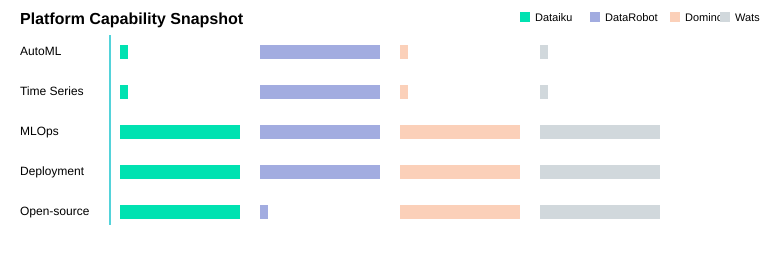
- DataRobot Enterprise AI Platform: Best when you need auto ml and governance at scale. Secretly great because it combines Automated ML, Time Series, and MLOps in one enterprise ai platform. Annoying if you expect AutoML to replace problem framing—it won’t; it’s a multiplier once the data is sane.
- Domino Data Science Platform: Best for “from notebook to product.” Secretly great at experiment tracking plus delivery via APIs/web apps. Annoying when teams underestimate the setup needed for smooth production delivery.
- IBM Watson Studio: Best when lifecycle automation and governance matter. Secretly good at leaning on open-source frameworks (PyTorch/TensorFlow) while standardizing the pipeline. Annoying if you want a lightweight tool with minimal enterprise overhead.
Mini anecdote: I once handed off a churn machine learning project mid-sprint. Dataiku’s shared flow and comments saved the handoff; in a notebook-only setup, we would’ve lost days re-learning assumptions.
| Platform | AutoML | Time Series | MLOps | API/Web deployment | Open-source support |
|---|---|---|---|---|---|
| Dataiku DSS | No | No | Yes | Yes | Yes |
| DataRobot Enterprise AI Platform | Yes | Yes | Yes | Yes | No |
| Domino Data Science Platform | No | No | Yes | Yes | Yes |
| IBM Watson Studio | No | No | Yes | Yes | Yes |
3) AutoML and “push-button” modeling: H2O.ai, SAS, Altair (auto ml)
When I need a fast baseline, auto ml tools feel like a shortcut—but only after I’ve done basic data preparation and agreed on success metrics. I keep Cathy O’Neil’s reminder close:
“Models are opinions embedded in mathematics.”
H2O.ai Driverless AI: open source speed + leaderboards
H2O.ai Driverless AI stands out for open source-friendly, distributed ML that can matter when data is large or training needs to run across machines. The practical artifact I like most is leaderboard generation: it ranks candidate models by metrics like AUC, F1, or RMSE. In team reviews, that leaderboard becomes a shared “debate board” for tradeoffs (accuracy vs. simplicity vs. runtime), not just a single winner.
SAS Visual Data Mining: automated insights + NLG for governance
SAS Visual Data Mining focuses on automated insights, model management, and strong governance. It also adds natural language generation (NLG) to explain results. I’ve seen NLG summaries calm execs who hate charts, but I treat them as a starting point—because they can oversimplify uncertainty, edge cases, and data drift.
Altair Data Analytics: Python R workflows with 1,500+ packages
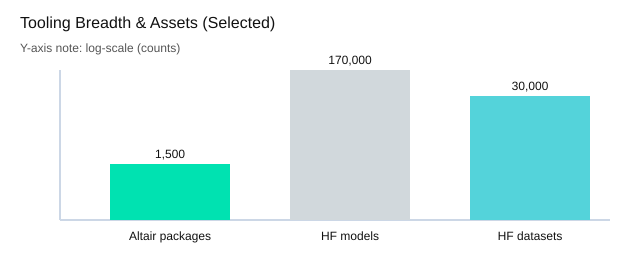
Altair emphasizes breadth for python r work: 1,500+ packages across multiple operating systems. To me, it feels like a well-stocked workshop for feature engineering, statistical modeling, and validation—especially when I want to mix classic methods with modern ML without leaving my usual tooling.
My rule of thumb
- AutoML shines after I define metrics, leakage checks, and a clean validation plan.
- Distributed ML matters when training time or data size becomes the bottleneck.
| Asset | Count / Examples |
|---|---|
| Altair packages | 1,500+ |
| Hugging Face models (reference later) | 170,000+ |
| Hugging Face datasets (reference later) | 30,000 |
| AutoML outputs to compare | AUC, F1, RMSE |

4) Open source backbone: Apache Spark + PyTorch (and why it still matters)
apache spark for large scale data and real time data
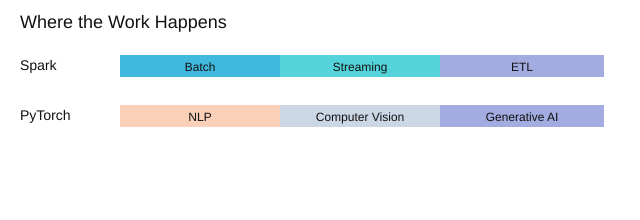
When my projects move from “it works on my laptop” to large scale data, apache spark is still my default. It handles batch processing, streaming for real time data, and iterative machine learning workflows without forcing me into one language. I can keep teams productive because Spark supports Python, R, Scala, and Java.
At scale, the pain points are predictable: big shuffles slow jobs down, data skew makes one executor do all the work, and feature stores can become a bottleneck if definitions drift between training and serving. Spark doesn’t magically remove these issues, but it gives me the tools to see them and design around them.
PyTorch for deep learning prototypes that feel natural
For deep learning, PyTorch is still the most comfortable place for me to experiment—especially NLP, computer vision, and generative AI. The dynamic computation graph makes it easy to iterate fast, inspect tensors, and change model logic without fighting the framework.
Yann LeCun: “Deep learning is a new kind of alchemy—except it’s actually science.”
What I’ve noticed in many “AI-powered solutions” is that the glossy UI often sits on top of open source. Platforms plug into Spark for data movement and into PyTorch for modeling, then add the parts I don’t want to rebuild: packaging, APIs, monitoring, and drift checks.
My practical pairing looks like this:
- Spark for data prep + streaming joins
- PyTorch for modeling and evaluation
- A cloud platform for deployment and monitoring to an API or Web app
| Category | Items |
|---|---|
| Workload types | Batch processing; Streaming (real time data); Iterative ML |
| Languages supported by Spark | Python; R; Scala; Java |
| Common deployment targets | API; Web app (count=2) |
5) Generative AI assistants in the daily grind (ChatGPT, Gemini, Copilot, DataLab)
In my day-to-day data workflows, generative ai tools act like a second set of hands—from a rough idea to a reproducible notebook and a clean deployment handoff. As Andrew Ng said, “AI is the new electricity.” I feel that most when I’m moving between data preparation, modeling, and documentation.
My go-to ai assistant and ai code assistants
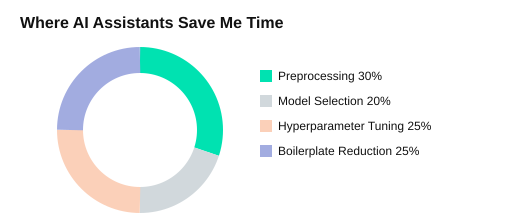
ChatGPT/GPT-4 is surprisingly good at preprocessing suggestions (missing values, encoding, leakage checks), model selection tradeoffs, hyperparameter tuning plans, and code reduction (less boilerplate). I often ask for Python or R snippets like sklearn pipelines or tidyverse recipes, then adapt them to my dataset.
Google Gemini is what I use when time-sensitive analysis needs real-time web data. I still do careful source checking, but it helps me quickly validate context (policy changes, market moves, new releases) before I update charts or assumptions.
GitHub Copilot is the quiet productivity boost. It shines on repetitive Pandas/SQL glue: joins, group-bys, window functions, and small refactors that keep notebooks readable.
DataCamp DataLab AI Assistant helps when I’m teaching or moving fast: fixing errors, generating code from natural language, and giving contextual suggestions inside the notebook.
Mini check: “If my teammate dropped in today, could they follow the notebook?” I use assistants to draft clearer markdown, rename variables, and add short explanations so the work is easier to hand off.
- Trust but verify checklist: rerun outputs, inspect data types, confirm sources, and write tests for key transforms.
| Tasks where AI assistants help | Assistant tools |
|---|---|
| Preprocessing | ChatGPT/GPT-4 |
| Model selection | Google Gemini |
| Hyperparameter tuning | GitHub Copilot |
| Code reduction | DataCamp DataLab AI Assistant |
Andrew Ng: “AI is the new electricity.”

6) RAG, agents, and the “second brain” stack: LangChain + LlamaIndex + Hugging Face
When I build retrieval augmented systems, I treat LangChain and LlamaIndex as the glue. They help me connect data sources, chunk and index documents, and orchestrate agent steps so answers come from my docs, not vibes. This matters in enterprise settings where governance, audit trails, and evaluation are non-negotiable.
LangChain + LlamaIndex: practical RAG building blocks
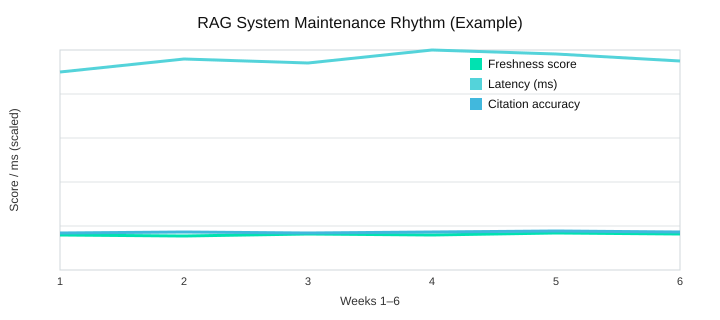
In my experience, these two show up everywhere in generative ai projects because they speed up the boring parts: loaders, retrievers, tools, and agent routing. I still avoid overpromising—RAG can fail if the retriever is stale or citations are weak—so I always test with a simple checklist.
- Citation accuracy (does the quote match the source?)
- Freshness (did we index the latest docs?)
- Latency (is it fast enough for real users?)
Hugging Face: pre trained models + customization path
Hugging Face stands out for its ecosystem: 170,000+ pre trained models and 30,000 datasets. When APIs aren’t enough, I look at AutoTrain as a practical path for teams without deep infra: it helps fine-tune and package models for model deployment with less custom plumbing, while still fitting into a broader machine learning workflow.
Scenario I keep replaying: tickets + docs + Slack
I often combine support tickets, product docs, and Slack threads into a searchable, auditable assistant. The “second brain” obsession is only useful if maintained—otherwise it becomes a confident liar. As Chip Huyen says:
“Data is a moving target—your system has to learn to move with it.”
What I measure weekly: latency, citation quality, and how painful it is to update embeddings.
| Item | Value |
|---|---|
| Hugging Face pre-trained models | 170,000+ |
| Hugging Face datasets | 30,000 |
| RAG quality checklist items | 3 (citation accuracy, freshness, latency) |
Conclusion: picking top data science tools without regrets
When I compare data science tools, I choose them the way I choose teammates: reliable under stress, honest about limitations, and good at handoffs. That mindset keeps me focused on outcomes, not hype. As DJ Patil said,
“The goal is to turn data into decisions, and decisions into better outcomes.”For me, the best top data science stack is the one that helps my team move from messy inputs to shipped value, using ai powered help where it truly saves time.
A simple decision map for data analysis tools
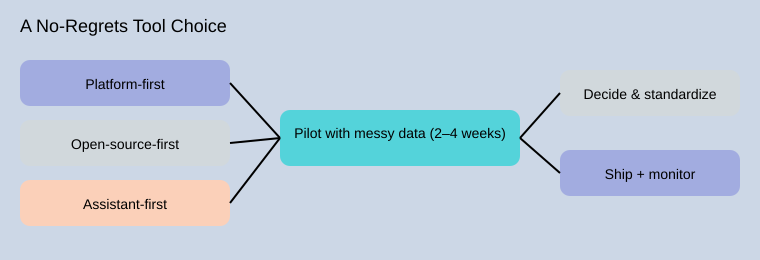
I use three decision paths. Platform-first fits teams that need governance, access control, and shared standards. Open-source-first fits teams that want flexibility and control over machine learning ai workflows. Assistant-first fits teams that want speed, especially for drafting code, explaining results, and reducing setup friction. In practice, I treat these as a coherent stack: a stable platform, open tools for depth, and an assistant for acceleration.
The two-tool rule: build, then ship
My “two-tool rule” keeps spending and complexity down: one tool for building (exploration, features, training) and one tool for shipping (deployment, monitoring, rollback). Everything else is optional. This is where many data analysis tools comparisons go wrong: teams optimize for model accuracy alone. The best results come when we run a realistic pilot that includes data preparation, collaboration, and deployment—not just metrics.
A 2–4 week pilot I trust
Before I sign anything, I run a small pilot with my own messy data and document what matters: a dataset snapshot, a baseline model, a deployment test, and a monitoring plan. That evidence makes the final choice feel calm, not risky.
| Decision paths (3) | Pilot timeline (weeks) | Pilot artifacts (4) |
|---|---|---|
| Platform-first; Open-source-first; Assistant-first | 2–4 | Dataset snapshot; Baseline model; Deployment test; Monitoring plan |
My last nudge: treat your tool stack like a kitchen. A food processor helps, but knife skills still matter—good data prep, clear handoffs, and a deployment checklist are what make ai powered work in the real world.
TL;DR: If you need speed and guardrails, start with AI-powered platforms (DataRobot, Dataiku, SAS, Watson). If you need flexibility at scale, pair open source (Apache Spark, PyTorch) with MLOps. For day-to-day momentum, add AI assistants (ChatGPT/GPT‑4, Gemini, Copilot, DataLab) and RAG builders (LangChain/LlamaIndex). The “best” stack is the one your team can ship and maintain.


Comments
Post a Comment