Automating Financial Reporting with AI

I still remember a month-end close where my coffee went cold three times while I chased a single variance that turned out to be a copy-paste “helpful” edit in Excel. That night, I promised myself I’d stop treating reporting like a monthly fire drill. In the last couple of years, I’ve watched AI financial reporting move from “interesting demo” to “quietly indispensable” for teams that need real time accuracy, cleaner data consolidation, and fewer surprises. This post maps the route I wish I’d had: the features that pay rent, the tools worth a pilot, and the rollout steps that keep auditors—and humans—comfortable.
1) Why I Finally Stopped “Closing by Heroics” (Automated Financial Reporting)
My month-end close used to feel like a rescue mission. One night, I chased a scary variance for hours—only to learn it wasn’t “real.” It came from a spreadsheet fork: two versions of the same file, both “final,” each with different filters. Add manual spreadsheets, copy-paste errors, and late adjustments, and I was basically closing by adrenaline instead of process.
What Automated Financial Reporting Really Means (Not the Brochure Version)
In practice, Financial Reporting Automation means the numbers flow from source systems to reports with fewer human handoffs. It’s not magic dashboards. It’s repeatable logic: consistent mappings, controlled calculations, and audit-friendly steps that reduce rework and improve Real Time Accuracy.
Where AI Financial Reporting Actually Saves Time
Once I stopped relying on heroics, I saw how AI helps in three places:
- Automated Reports: recurring packs refresh on schedule, with commentary prompts and variance flags.
- Workflow automation: tasks route to the right owner, approvals are tracked, and close checklists stop living in inboxes.
- Fewer reconciliations: anomaly detection highlights what changed, so I review exceptions instead of every line.
This is how Operational Efficiency shows up: less time assembling, more time explaining. And that’s the real shift—AI moves us from manual spreadsheets to proactive strategic guidance and predictive analytics.
"Finance teams don’t need more dashboards—they need fewer surprises and a clean line from transaction to narrative." — Andrew Fastow
Why the Urgency Is Real
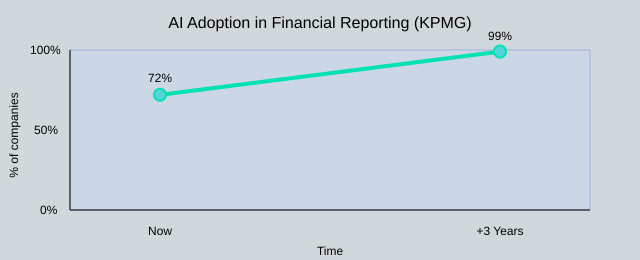
KPMG reports 72% of companies are piloting or using AI in financial reporting today, and that’s expected to reach 99% within three years. I don’t want to compete with teams who close calmly while I’m still on frantic radios.
My wild-card analogy: finance should run like air-traffic control—calm screens beat chaos. AI assists, but governance still matters: access controls, clear definitions, and human review for judgment calls.
| Month-end close pain points | What it looks like |
|---|---|
| Manual spreadsheets | Multiple versions, inconsistent formulas |
| Copy-paste errors | Broken links, wrong ranges, silent mistakes |
| Late adjustments | Last-minute entries that ripple through reports |
| KPMG adoption trend | 72% now → 99% in 3 years |

2) The Unsexy Backbone: Data Consolidation + Real Time Reporting
Before AI can help, I need Financial Data Consolidation. In real life, my numbers live in an ERP, a CRM, a payroll tool, and a maze of spreadsheets plus “misc. CSVs.” Every manual export becomes a reporting tax: mismatched account names, duplicate customers, and “final_v7.xlsx” logic no one owns. That’s why I treat Data Consolidation as the control layer, not busywork.
Seamless Integration checklist (what I ask before trusting Financial Reporting Software)
When a vendor says Seamless Integration, I ask for specifics—especially with Cloud Based Reporting where refreshes run on schedules.
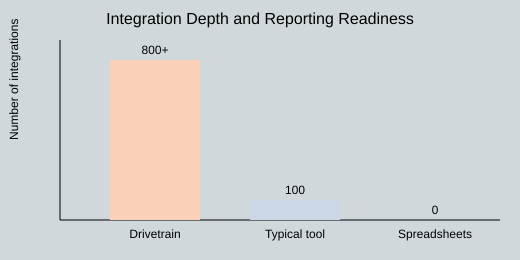
- Source systems: Can it connect to my ERP/CRM and the “long tail” tools? (Drivetrain’s Drive AI suite supports 800+ integrations, which matters when teams scale.)
- Mapping: Who owns the chart-of-accounts and customer mapping rules?
- Refresh cadence: 15 min, 1 hour, or daily batch—what’s realistic and what breaks reminds?
- Audit Trail Maintenance.: Can I see what changed, when, and by whom?
- Failure handling: Do I get alerts, retries, and clear logs?
"The value of real-time reporting is proportional to the trust you have in the pipes feeding it." — Amy Hood
Real Time Reporting vs “near-time”: where latency bites
Real Time Reporting is only useful when it protects decisions: board decks (last-minute variance questions), cash (collections and burn), and covenants (ratios that can’t wait for a nightly batch). “Near-time” is fine until a one-hour delay hides a failed payment run or a revenue spike that triggers an anomaly flag. Real Time Accuracy is the goal; speed is just the method.
Small tangent: the broken connector that made me love logs
One month, a connector silently stopped syncing refunds. The dashboard looked “clean” but wrong. Since then, I insist on logging, alerts, and Audit Trail Maintenance. If I can’t trace a number back to a source row, it’s not reporting—it’s guessing.
| Item | Example |
|---|---|
| Integration scale | Drivetrain: 800+ integrations |
| Refresh cadences | 15 min; 1 hour; daily batch |
3) Key Features That Actually Matter (and the Ones I Ignore)
When I evaluate automation tools for financial reporting, I don’t start with flashy demos. I start with Key Features that protect accuracy and trust. As Mary T. Barra said:
"An effective control environment is a product feature, not a policy document." — Mary T. Barra
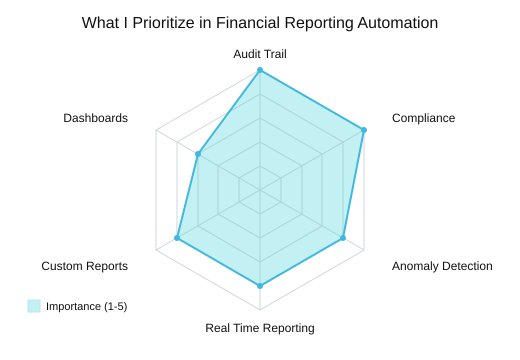
Key Features I insist on (non-negotiable controls)
- Audit trail maintenance: every change is logged, searchable, and exportable.
- Automated Compliance: built-in checks for GAAP/IFRS compliance standards, not a manual checklist.
- Role-based approvals: the right people sign off, in the right order.
- Versioning: I need to compare “what changed” without email threads.
AI Powered Analytics in real life (not magic)
I care about AI Powered Analytics when it helps me explain numbers faster: Variance Analysis by entity/account, predictive trends for cash and revenue, and narrative insights that draft plain-English commentary. I ignore “AI” that only makes charts prettier or hides logic behind a black box.
Anomaly Detection: catching the one weird transaction
Anomaly Detection complements controls—it doesn’t replace them. It’s most useful for surfacing outliers early, so humans can verify source data and timing. Quick example: AI flags a revenue spike above the normal range; my team checks the booking source, cutoff timing, and whether a one-time contract was posted to the wrong period.
Custom Financial Reports + Customizable Dashboards (flexibility without chaos)
I want Custom Financial Reports and Customizable Dashboards so each stakeholder sees what they need, without spawning spreadsheet copies. I ignore tools that force rigid templates or require heavy IT work for every new view.
| Feature | Value to me |
|---|---|
| Audit trail maintenance | Traceability for audits and reviews |
| Automated compliance (GAAP/IFRS) | Fewer manual checks, fewer misses |
| Anomaly detection | Early warnings before leadership sees surprises |
| Custom financial reports | Stakeholder-ready outputs without rework |
| Workflow automation | Faster close with clear ownership |
| Conversational analytics | Ask “why did this change?” and get a starting point |
Illustrative anomaly thresholds: 2σ=12 flags/month, 3σ=4 flags/month, 4σ=1 flag/month

4) Tool Tour: What I’d Pilot First (FP&A Tools + AI Tools Financial)
When I evaluate FP&A Tools, I map them to maturity: Excel-native for teams that live in spreadsheets, and enterprise suites when scale and governance matter. My rule: pilot one “keep Excel” tool plus one “AI answer engine.” As Satya Nadella said:
"Tools don’t replace judgment; they compress the time between question and insight." — Satya Nadella
Excel Integration lovers’ corner (keep the spreadsheet feel)
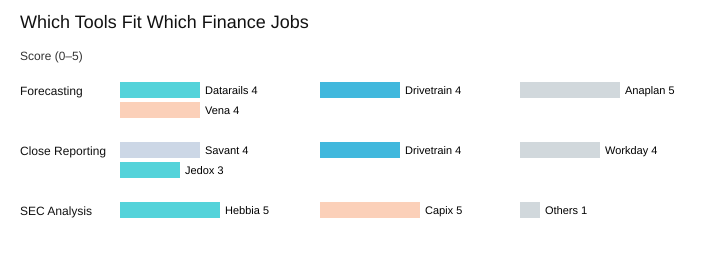
If your team wants Excel Integration without broken links and manual copy/paste, I’d start with Datarails or Vena Copilot. They keep the spreadsheet workflow but fix the plumbing: data consolidation, scenario analysis, and forecasting. For many mid-market teams, these are the Best FP&A Tools to pilot because adoption is fast.
Enterprise muscle (complexity is the point)
When you need multi-entity planning, permissions, audit trails, and heavy modeling, I look at Anaplan, Workday Adaptive Planning, Pigment, and Jedox. These platforms fit higher maturity levels where standardization beats flexibility.
Speed-to-value picks (AI Powered Tools for forecasting + workflows)
For quick wins, I like Drivetrain (Drive AI) and Planful Predict. Drivetrain stands out with anomaly detection, conversational analytics, AI model generation, and 800+ integrations. These are practical AI Tools 2026 options when you want forecasting and workflow automation without a long implementation.
SEC Filings Analysis + unstructured data (specialized AI)
For SEC Filings Analysis, I’d pilot Hebbia (summarizes unstructured data and analyzes spreadsheets without coding) and Capix (10-K/10-Q extraction, peer benchmarking, disclosure comparisons). This is where specialized AI Tools Financial can benchmark peers and automate disclosure comparisons.
Wild card: In a board meeting, someone asks, “why did margins dip?” With conversational AI connected to your model, I want an answer in 30 seconds—variance driver, peer context, and the source lines.
| Marker | Tool(s) | Use-case frequency |
|---|---|---|
| Integrations | Drivetrain (800+) | Forecasting=high |
| Excel-native | Datarails, Vena Copilot | Close reporting=high |
| SEC filings analysis | Hebbia, Capix | SEC analysis=medium |
| Automated custom reports | Savant (ERP/CRM) | Peer benchmarking=medium |
5) Scenario Analysis, Budgeting Forecasting, and the ‘What If’ Muscle
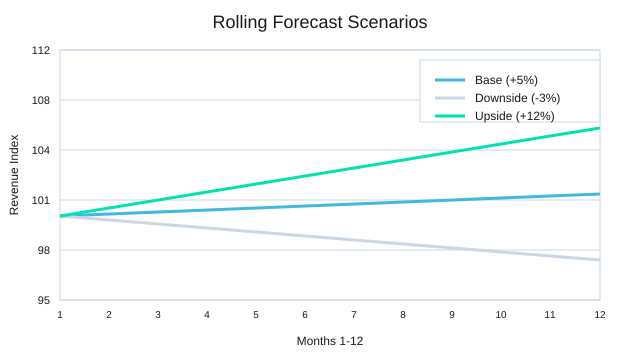
In Financial Planning Analysis, I’ve learned that Scenario Analysis is how we turn “I think” into “Here are three modeled outcomes.” With AI in my reporting stack, Scenario Planning is faster because I can iterate in minutes, not days—AI-enabled scenario planning speeds iteration and improves decision cadence without pretending we can predict everything.
"Planning isn’t about predicting the future; it’s about being less surprised by it." — Indra Nooyi
Scenario Analysis: Base, Downside, Upside (with margin + cash impacts)
I keep it simple and consistent: Base, Downside, and Upside. Then I map each to margin and cash impacts so leaders can act, not debate assumptions. This is where Data Driven Insights and Predictive Trends help: AI can flag patterns (seasonality, churn risk, pricing pressure), but I still treat outputs as signals—not certainty.
| Scenario | Revenue | EBITDA Margin | Forecast Horizon |
|---|---|---|---|
| Base | +5% | 18% | 12 months rolling forecast |
| Downside | -3% | 14% | 12 months rolling forecast |
| Upside | +12% | 20% | 12 months rolling forecast |
Budgeting Forecasting workflows that re-forecast fast
For Budgeting Forecasting, I prefer driver-based models (volume, price, headcount), rolling forecasts, and quick re-forecasts. AI reduces manual spreadsheet labor by generating model updates and narratives while keeping controls—especially when the model logic is standardized.
When “build me a revenue bridge” actually works
With automatic financial model generation (e.g., Drivetrain) and natural language prompts, I can type:
Build me a revenue bridge from last month to this month by price, volume, mix, and churn.
Then I review assumptions, lock inputs, and publish.
Quick confession: I still sanity-check forecasts in Excel (and I’m not ashamed). AI accelerates the work; my judgment protects it.

6) Compliance, Controls, and the Human Factor (a.k.a. Why This Fails)
When AI reporting projects fail, it’s rarely the model. It’s the missing controls. In my experience, Automated Compliance only works when I treat it like a finance system change, not a data science demo. As Ruth Porat said:
"Trust is built when your numbers are reproducible—especially by someone who disagrees with you." — Ruth Porat
Automated Compliance + Compliance Standards (GAAP/IFRS)
I start by mapping every report line to Compliance Standards (GAAP/IFRS) and locking down Audit Trail Maintenance. That means every transformation has a source, a rule, and a timestamp. If I can’t reproduce a number from raw inputs, it doesn’t ship.
Workflow Automation: approvals, segregation of duties, overrides
Workflow Automation is where governance becomes real: permissions, change logs, and sign-offs. I define who can refresh data, who can edit logic, and who can approve outputs. I also document override rules—because overrides will happen.
Conversational Analytics: useful, but not “official”
Conversational Analytics can speed up analysis, but it can also create “shadow reporting.” I keep chat answers out of official decks by labeling them as exploratory, restricting access to certified datasets, and requiring a signed report package for close numbers. If it isn’t in the controlled workflow, it isn’t a number of record.
My rollout rule: parallel run before retirement
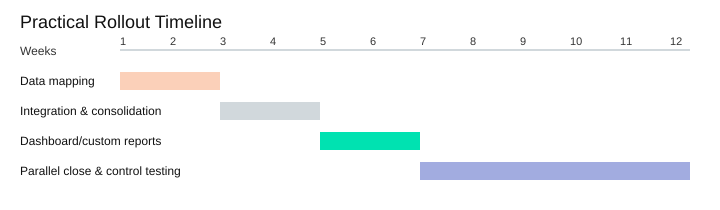
My practical timeline is 4–12 weeks of setup, then one quarter running AI and the old process in parallel (illustrative). That’s where I test controls, not just accuracy.
Pragmatic checklist for FP&A leaders (6 key controls)
- Access: role-based permissions
- Approvals: defined sign-offs before publish
- Versioning: report logic and prompts tracked
- Reconciliation: tie-outs to GL/subledgers
- Audit log: immutable change history
- Exception handling: documented breaks + owners
| Item (illustrative) | Recommendation |
|---|---|
| Pilot setup | 4–12 weeks |
| Parallel run | 1 quarter |
| Control checklist | 6 key controls |
Gentle reminder: AI won’t fix unclear definitions. If we can’t agree on what counts as ARR, the automation will just scale the confusion.
Conclusion: The Calm Close (and What I’d Do Monday Morning)
I still remember the cold coffee on my desk—the kind you forget because you’re chasing numbers, fixing links, and re-exporting files at the last minute. That’s the old way: heroics. What I want now is calm, repeatable Financial Reporting Processes where automated financial reporting is the default, not a special project. With AI Financial Reporting, the competitive advantage isn’t the tech itself; it’s the better decisions you can make when reporting is faster and more reliable.
My Monday Morning Plan for Financial Reporting Automation
If I were starting Monday, I’d keep it narrow because organizations that begin with a small pilot tend to scale successfully. I’d pick one report (say, the monthly P&L), one data source (ERP or billing), and one approval workflow (who reviews, who signs off). Then I’d build Automated Reports that refresh on schedule, flag exceptions, and leave an audit trail. Once that’s stable, I’d expand to the next report and repeat—same pattern, less stress, more trust.
"Automation should give you time back to think—not just time to do more work." — Tim Cook
From Manual Prep to Data Driven Insights
The real win is time returned to analysis, narrative, and better questions. In practice, I’ve seen teams shift from spending about 70% on manual prep and 30% on analysis to something closer to 40/60. That’s where Data Driven Insights show up—and where AI financial reporting shifts finance from spreadsheet cleanup to proactive strategic guidance and predictive analytics.
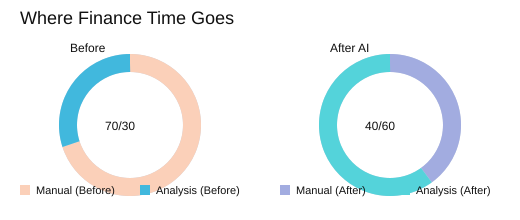
| Measure | Before | After AI |
|---|---|---|
| Time split (Manual prep vs Analysis) | 70% / 30% | 40% / 60% |
| AI adoption context (estimate) | 72% now | 99% in ~3 years |
My wild card is this: I picture finance as a newsroom. AI handles the transcription—collecting, cleaning, and reconciling—while I write the story and ask sharper questions. If you want a grounded next step, shortlist two tools and run a demo using your messiest dataset. Then tell me: which report would you automate first?
TL;DR: AI can automate reports, consolidate financial data, flag anomalies, and even answer questions in plain language—but only if the data pipes, controls, and workflows are real. Start with one reporting pain, demand audit trails, keep Excel integration where it helps, and scale from there.


Comments
Post a Comment