AI Transformation in Operations: Real Results

The first time I watched an “AI bot” schedule shifts, I didn’t feel futuristic—I felt annoyed. It put my most reliable night-shift supervisor on a Tuesday morning. But that little mistake forced a bigger, better question: if AI can mess up something so human, why are we betting Business Transformation on it? Over the last year, I’ve collected the unglamorous, real results—where AI Transformation boosts operational efficiency, where it quietly bleeds time, and the oddly simple habits that separate high-maturity teams from everyone else.
1) My “AI Strategy” wake-up call: start with pain, not pilots
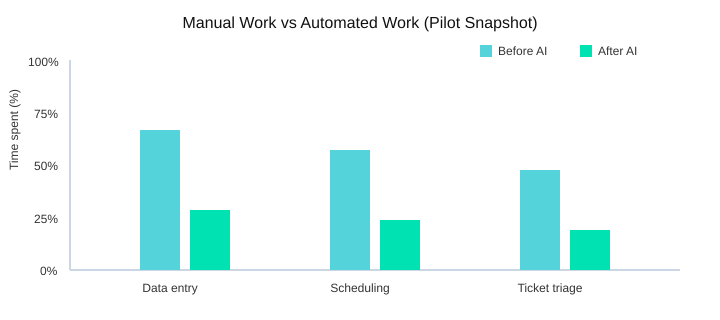
I used to treat AI Implementation like a side quest: run a cute pilot, show a demo, move on. Then operations pushed back. The real pain wasn’t “lack of AI”—it was hours lost to Manual Tasks like data entry, scheduling, and ticket triage. Research backs this up: AI can automate repetitive work like data entry and scheduling, which is where time quietly disappears.
Start with the ugliest work (and keep the shortlist small)
Now my AI Strategy starts with a 5–7 item use-case shortlist. I pick the messiest workflows first because they reveal the truth: broken handoffs, unclear rules, and “tribal knowledge” that never made it into a system.
A messy pilot is still a gift
When a pilot goes sideways, I don’t panic—I document. It usually exposes hidden policies (who actually approves exceptions?) and data gaps. That’s why I use a simple checklist of four pillars: strategy, data, tooling, and change management. If one pillar is weak, the pilot will tell on you fast.
Map every use case to Business Goals (and one KPI)
I map each idea to Business Goals: speed, quality, cost, and risk. Then I pick one primary KPI I can defend in a meeting—yes, this is where my spreadsheet addiction shows up. Businesses with clear AI goals tend to implement faster and get measurable results, so I force clarity early.
| Pain point | AI option | Primary metric | Expected operational gains |
|---|---|---|---|
| Data entry | Automate Processes (extraction + validation) | Cycle time | Higher Operational Efficiency |
| Scheduling | AI-assisted scheduling | On-time rate | Fewer delays |
| Ticket triage | Auto-classify + route | First-response time | Lower backlog risk |
“AI is the defining technology of our time—like electricity—transforming every industry and every part of our lives.” — Satya Nadella
My wild-card analogy: AI is like hiring a brilliant intern—fast, eager, occasionally confident-and-wrong—so supervision is part of the budget.

2) The trust gap is real: AI Readiness inside a Tech Organization
I’ve noticed the loudest blocker isn’t budget—it’s trust. In almost every Tech Organization I’ve worked with, someone eventually asks, “Will this model embarrass us in front of customers?” That question is really about AI Readiness: not just tools and data, but whether people believe the system will behave under pressure.
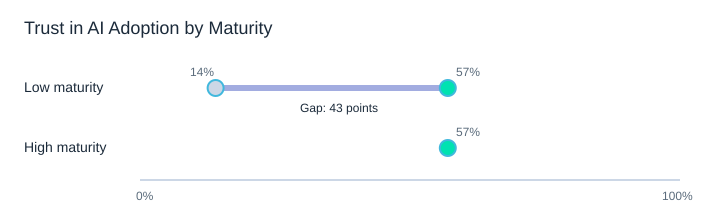
The numbers back this up. High-maturity companies report 57% trust in AI adoption, while low-maturity organizations report only 14%—a 43-point gap[1]. And only a small fraction of organizations are fully AI-ready, which creates a real competitive gap[2].
AI Strategy: treat trust like a product feature
High-maturity teams build trust the same way they build reliable software: monitoring, feedback loops, and clear escalation paths. My rule is simple: if we can’t explain the decision, we don’t automate the decision (yet). Instead, we use Intelligent Automation to automate the paperwork around it—routing, summaries, evidence capture, and audit trails—while humans keep the final call.
Small tangent: the first time I saw a dashboard with model drift, I felt weirdly relieved—like, finally, an honest warning light.
Risk Management with light-touch governance
- Model cards (what it does, limits, data sources, known failure modes)
- Approval gates before production changes
- Human-in-the-loop for high-impact decisions
- Change management as an AI Readiness pillar: training, comms, and ownership[4]
| Maturity level | Trust in AI adoption | Typical controls |
|---|---|---|
| Low maturity | 14% | Ad hoc reviews, unclear owners |
| High maturity | 57% | Monitoring, feedback loops, escalation paths |
| Trust gap | 43 points | Governance + change management closes it |
Andrew Ng: “AI is the new electricity.”
3) Where AI actually moves the needle: Predictive Analytics in operations
Predictive Analytics is where I’ve seen the least hype and the most payoff: forecasting demand, flagging bottlenecks, and reducing fire drills. When I use it well, I’m not “doing AI”—I’m protecting Operational Efficiency and making decisions earlier, when they’re cheaper.
You don’t do digital transformation for technology; you do it for the business outcomes.
—Jeanne W. Ross
Predictive Forecasting: the clean-data advantage
Predictive Forecasting feels like cheating—in a good way—when it’s fed by clean operational data and seasonal context. That’s also why early AI adopters tend to gain Competitive Advantage: they build better predictions sooner, then pair them with personalization and smarter planning to drive Business Success.
My rule: predict first, automate second
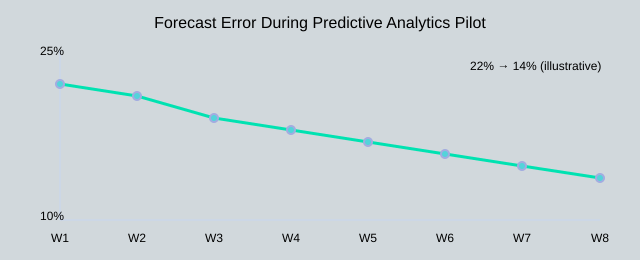
I like a simple rule: predict first, automate second. Otherwise, you automate yesterday’s mistakes at scale. A practical pilot usually takes 8–12 weeks to validate forecasting lift and prove the model can hold up in real operations.
Mini scenario: 48-hour warning beats a perfect post-mortem
If my warehouse sees a 2-week lead-time wobble, I’d rather get a 48-hour warning than a perfect post-mortem. That warning lets me shift labor, expedite a lane, or adjust reorder points before service levels drop.
| Use case | Data needed | Value signal | Risk |
|---|---|---|---|
| Demand forecast | Sales history, promos, seasonality | Lower stockouts/overstock | Promo data gaps |
| Lead-time risk | POs, carrier scans, supplier history | 48-hour early alerts | Noisy scan events |
| Capacity planning | Labor, throughput, constraints | Fewer bottlenecks | Hidden constraints |
| Fraud/credit ops (finance) | Transactions, labels, rules | Faster review queues | Bias/false positives |
Across retail, manufacturing, and finance, I’ve seen productivity lift most when teams pick one workflow, measure error, and iterate.
4) Supply Chain + Fraud Detection: the unsexy wins I brag about
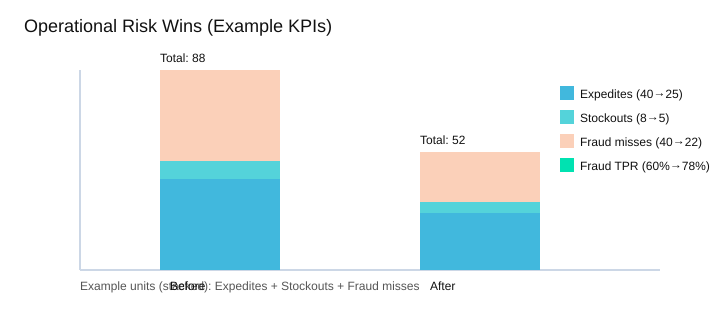
In my operations work, Supply Chain AI is rarely flashy. It’s mostly fewer surprises: fewer expedites, fewer stockouts, and fewer awkward calls to explain why a promise slipped. That’s the kind of Operational Efficiency I’ll brag about, because it compounds quietly.
Across retail, manufacturing, and finance, research keeps showing the same pattern: AI boosts productivity when it’s applied to the real work of each sector, not as a generic “AI layer.” In the Supply Chain, that means better demand signals and smarter replenishment. In Fraud Detection, it means catching weird patterns early, before losses spread.
Risk Management that people actually trust
Fraud Detection is where I stop arguing with skeptics. When a model flags an unusual refund loop or a new account pattern early, it’s instantly “real.” But I learned to separate alerts from actions: too many alerts kill adoption; fewer, higher-confidence alerts build business success and stronger Risk Management.
Quick aside: the best fraud model I’ve seen wasn’t the smartest—it was the one operations actually used every day.
“The science of today is the technology of tomorrow.” — Ginni Rometty
Example KPIs (illustrative)
| Metric | Before | After |
|---|---|---|
| Expedite shipments / month | 40 | 25 |
| Stockout rate | 8% | 5% |
| Fraud true-positive rate | 60% | 78% |
Supply Chain vs Fraud Detection (what I watch)
| Area | Signals | Typical actions | Owners | Failure modes |
|---|---|---|---|---|
| Supply Chain | Demand shifts, lead-time drift | Reorder, rebalance inventory | Planning + ops | Bad master data, slow execution |
| Fraud Detection | Velocity, device, refund patterns | Hold, step-up, review | Risk + CX | Alert fatigue, high false positives |
And yes, AI can enable light personalization too: fewer false declines and smarter step-up checks protect the Customer Experience without letting risk leak through.
5) The money question: AI Investments, revenue impact, and the “co-pilot” reality
When finance asks me for ROI, I don’t oversell magic. I frame AI Investments like a portfolio: a few fast, low-risk Productivity Improvements (ticket triage, report drafts, faster root-cause notes), plus longer bets (forecasting, dynamic scheduling, smarter inventory). That mix makes the Revenue Impact conversation honest and measurable.
A.G. Lafley: "Consumers are statistics. Customers are people."
AI Predictions meet the co-pilot reality
On the floor, the “co-pilot” economy is not theory. I see analysts move from typing to checking, from searching to deciding. The best wins come when we redesign the handoff: AI proposes, humans approve, and the system logs what changed. That audit trail is what turns AI Predictions into operational trust.
Why SMBs often move faster
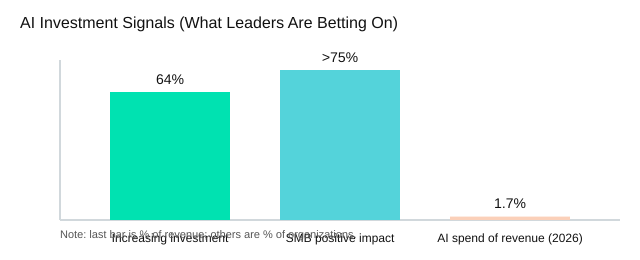
SMBs can change a process without a six-month committee cycle, so they capture value sooner. That may explain why over 75% of SMBs using AI report positive revenue impact and efficiency gains [2]. Enterprises can match that pace, but only if they standardize workflows and stop treating every pilot like a custom project.
My clearest proof of Business Transformation
I keep one slide titled “What we stopped doing”: manual reconciliations, duplicate status emails, weekly copy-paste dashboards. It’s the simplest way to show Business Transformation and competitive advantage—because time removed is capacity gained.
| Signal | Data | What it implies for ops leaders |
|---|---|---|
| Organizations increasing AI investments (next 2 years) | 64% [3] | Budget pressure rises; prioritize use cases with clear owners and metrics. |
| Expected AI spend as share of revenues (2026) | 1.7% [7] | Plan for recurring run-costs (models, data, governance), not just pilots. |
| SMBs reporting positive revenue impact/efficiency gains | >75% [2] | Speed matters; simplify approvals and ship “good enough” workflow changes. |

6) My AI Playbook for Skills Transformation (and fewer messy rollouts)
I don’t think AI Transformation fails because models are dumb; it fails because people feel replaced, rushed, or left out. My AI Playbook starts with Skills Transformation, because that’s the quiet hero that keeps rollouts calm and useful.
Fei-Fei Li: "The future is not about human versus machine; it is about human with machine."
Skills Transformation before tools
I teach three habits first: prompt basics, validation steps, and when not to use AI. If we want teams to Implement AI safely, they need a simple checklist: verify sources, spot edge cases, and know when a human must decide.
- Prompt habits: clear goal, constraints, examples.
- Validation: cross-check numbers, compare to SOPs, test on past tickets.
- Boundaries: no AI for approvals, legal wording, or sensitive data without review.
Deploy Chatbots only after escalation is written
I only Deploy Chatbots after we write the escalation script. Otherwise we just automate frustration. The bot must know when to hand off, what context to pass, and how to capture feedback for fixes.
Agentic AI needs “seatbelts”
Research shows Agentic AI and hyperautomation can automate complex decision-making processes[1]. I want Agentic Workflows with seatbelts: permissions, logs, and a kill switch. That’s how we automate tasks without losing control.
For scale, I build on Cloud Native platforms, because cloud-native platforms are essential for scalable AI integration in operations[3].
| Capability | Skills needed | Governance control |
|---|---|---|
| Chatbots | Conversation design, escalation writing | Human handoff + transcript logs |
| Automation | Process mapping, exception handling | Role permissions + audit trails |
| Agentic | Goal setting, tool-use testing | Logs, permissions, kill switch |
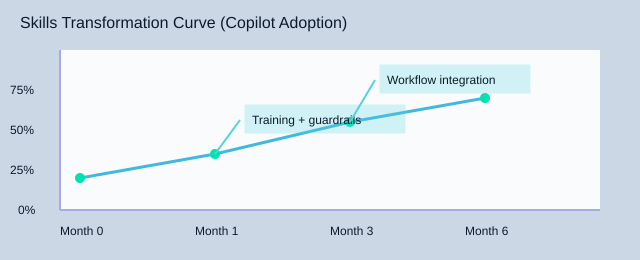
| Month | Adoption milestone | Governance controls count |
|---|---|---|
| 0 | 20% using copilots | 3 (logs, permissions, kill switch) |
| 1 | 50% using copilots | 3 |
| 3 | 70% using copilots | 3 |
| 6 | 70%+ sustained in workflows | 3 |
Conclusion: Real results are boring—and that’s the point
At the start of this piece, I talked about my scheduling mess: too many handoffs, too many “quick” updates, and not enough time to think. That’s why I’ve stopped chasing “AI everywhere” and started chasing Operational Efficiency in specific, measurable places. The wins that last are not flashy. They look like fewer steps, fewer errors, and fewer follow-ups.
Peter Drucker: "What gets measured gets managed."
The throughline I keep coming back to is simple: AI Strategy + data preparedness + cloud-native tooling + change management = Business Transformation that sticks. I’ve learned (sometimes the hard way) that AI Transformation is not a model you “install.” It’s a set of choices you repeat: what to automate, what to standardize, what to measure, and how to help people adopt the new workflow. Those four pillars—strategy, data, tooling, and change management—are what turn pilots into real operations.
My favorite litmus test is boring on purpose: if the team can describe the new workflow without mentioning AI, it’s probably working. When the conversation shifts from “the bot said…” to “the request is routed, checked, and scheduled automatically,” trust starts to build. That’s also where I keep AI Predictions grounded: I don’t need futurism-for-futurism’s sake; I need next week to run smoother than last week.
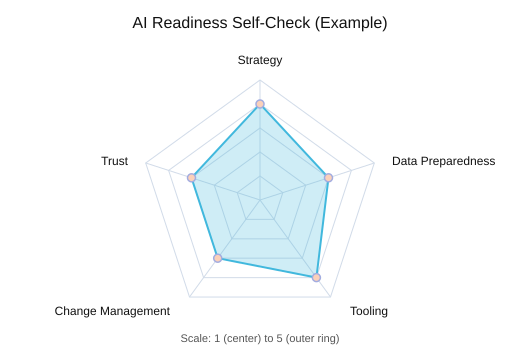
| Metric | Value |
|---|---|
| AI spending expectation (2026) | 1.7% of revenues |
| Readiness self-score (1–5) | Strategy 4; Data 3; Tooling 4; Change 3; Trust 3 |
Imagine it’s 2026 and AI spend is 1.7% of revenue. What would you be embarrassed not to have automated by then? For me, it’s the scheduling and status work that steals focus. If I were starting Monday morning, I’d pick one workflow, define one metric, and make the “boring” version of success repeatable.
TL;DR: AI Transformation in operations works when I tie it to business goals, prepare data, choose cloud-native tooling, and manage change—then measure results (trust, cost, cycle time, revenue impact).


Comments
Post a Comment