AI In Action: HR Digital Transformation Wins
The first time I watched an HR inbox hit “999+,” it wasn’t during open enrollment—it was after a payroll policy change that seemed “small” in a meeting and catastrophic in real life. What surprised me later wasn’t that we needed more agents. It was that the same five questions kept coming in, like a loop. That’s the moment AI in HR stopped feeling like a shiny demo and started feeling like a practical lever: not to replace HR, but to stop wasting human patience on copy‑paste answers.
1) HR Digital Transformation: the day tickets broke me
I still remember my “999+ inbox” moment. It wasn’t a crisis headline—just a wall of repeat questions. That’s when HR Digital Transformation stopped being a slide deck and became my daily reality. In HR operations, Digital transformation is not flashy. It’s the unglamorous work of making Employee support faster, clearer, and consistent across a global workforce.
Global HR bottlenecks don’t look dramatic—they look familiar
Our Global HR bottlenecks showed up as the same five questions, over and over, across email and chat. I made an early mistake: I tried to “fix” it by publishing a new policy page. But the real problem was intake—employees didn’t know where to go, and HR didn’t have a clean way to deflect or route requests.
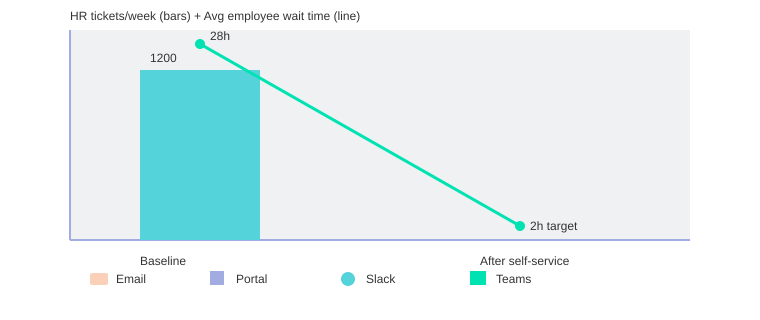
Baseline, we were handling 1,200 tickets/week, and the top 5 questions made up 62% of the load. The worst part wasn’t volume—it was Employee wait time. People waited 28 hours on average, which quietly eroded trust.
AI in HR: the unglamorous fix that actually works
What changed was treating AI in HR like an operations tool, not a novelty. Leading enterprises use AI assistants to cut ticket volumes and enable a Self-service experience. We focused on three basics:
- Deflect repeat questions with approved answers (and links) before a ticket is created.
- Route edge cases to the right specialist with better categorization and context.
- Document answers so every resolved case improves the next interaction.
We also pushed for a unified employee experience across Email, Portal, Slack, and Microsoft Teams, so employees could ask once and get the same quality response anywhere.
Dave Ulrich: "When HR spends less time on transactions, it earns the right to spend more time on transformation."
Quick gut-check: where employees lose time (and trust)
- They don’t know the “right” channel, so they ask in three places.
- They re-explain the issue because context isn’t carried forward.
- They wait for simple answers that should be instant.
| Metric | Value |
|---|---|
| Baseline HR tickets/week | 1,200 |
| Top 5 questions share of total tickets | 62% |
| Average employee wait time before AI | 28 hours |
| Average employee wait time after self-service rollout (target) | 2 hours |
| Channels supported | Email, Portal, Slack, Microsoft Teams |

2) AI and automation that actually helps: Self-service support without the cold vibe
When I talk about AI and automation in HR, I’m not chasing a “no humans needed” dream. I’m aiming for Self-service support that feels fast, helpful, and human. People want instant answers, but they also want an easy escape hatch: “escalate to a person” when the issue is sensitive or messy.
Josh Bersin: "The best HR tech disappears into the flow of work—and that’s exactly what employees want."
Self-service support done right (with an “escalate to human” option)
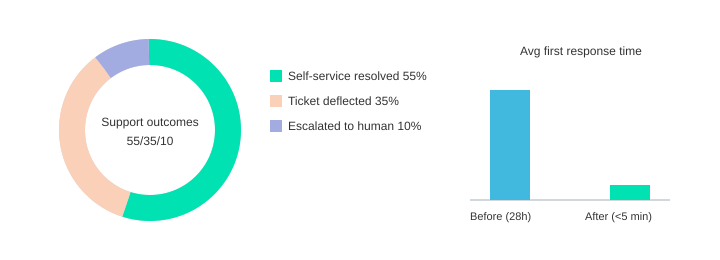
In real life, employees will still message “hey quick question” even if the portal is perfect. That’s why the best Self-service experience meets them where they already work—especially with Microsoft Teams integration (and Slack). With an AI-powered assistant in Teams, I’ve seen average first response time drop from “sometime tomorrow” to <5 minutes.
What an Agentic AI assistant actually means
I define an Agentic AI assistant in plain language like this: it doesn’t just generate text—it can take actions across systems based on permissions. Tools like Moveworks Omni and Navi show this well: they connect to HR, IT, and knowledge systems to deliver instant answers in Slack and Teams, and they can move work forward.
- Triage: understand the request and route it correctly
- Summarize: capture context so employees don’t repeat themselves
- Trigger workflows: reset access, start a leave request, update details
My mini rule: automate the predictable, humanize the emotional
I automate policy lookups, status checks, and “how do I” tasks. But I keep hard conversations—performance issues, accommodations, personal crises—with humans. That balance improves Employee support and trust, because speed reduces frustration and escalation stays respectful.
Governance basics (without the legal maze)
I insist on three basics: data privacy, role-based permissions, and audit logs so we can see what the assistant accessed and did.
| Metric (example targets) | Value |
|---|---|
| Ticket deflection rate | 35% |
| Self-service resolution rate | 55% |
| Escalation-to-human rate | 10% |
| Average first response time in Teams after AI | <5 minutes |
| Knowledge article reuse increase | 3x |
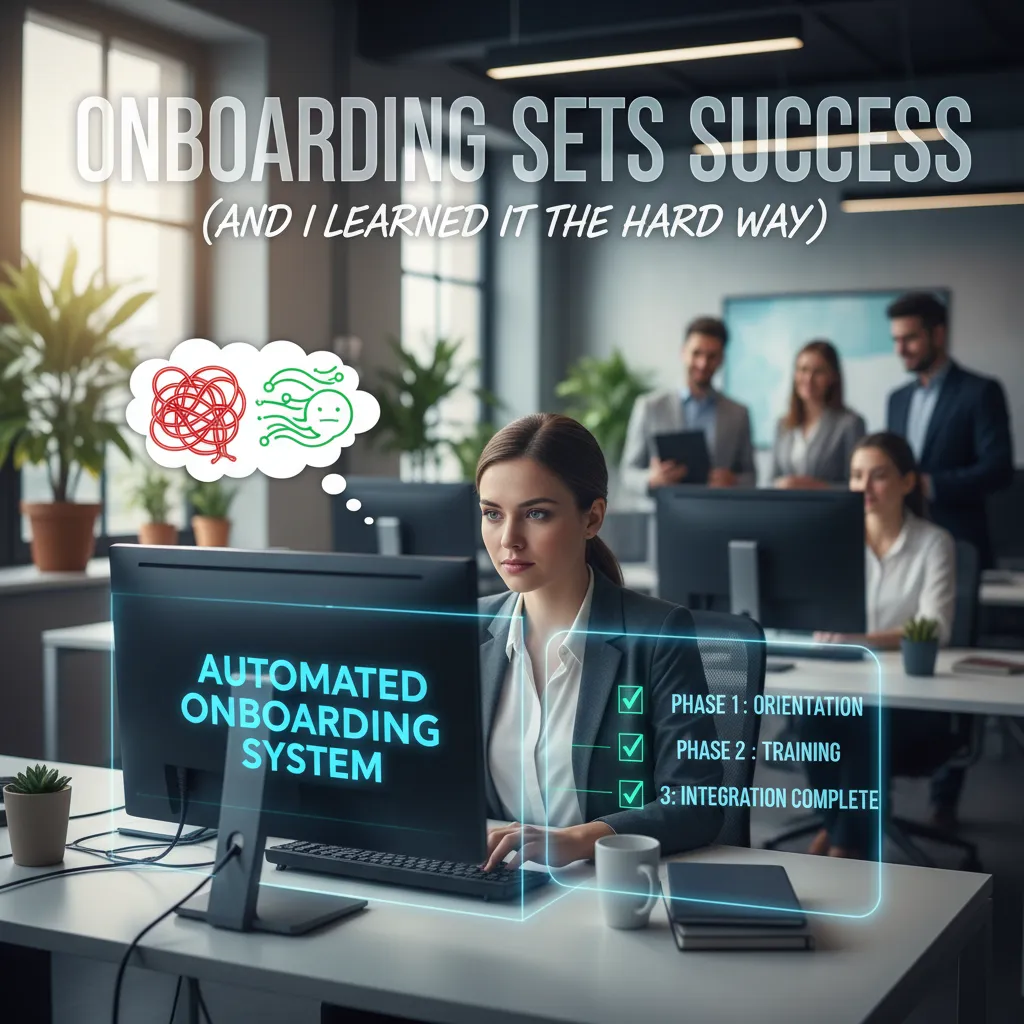
3) Automating onboarding: “Onboarding sets success” (and I learned it the hard way)
My first day at a new job was a small horror story: my laptop arrived late, my credentials were missing, and the “welcome” felt like a prank. I spent hours waiting, guessing who to contact, and feeling like I didn’t belong. That’s when I learned the phrase I now repeat in every HR transformation meeting: Onboarding sets success. It shapes engagement, confidence, and even retention in the first week.
Laszlo Bock: "A great onboarding experience is a promise kept—culture in the form of small behaviors."
Automating onboarding across the lifecycle (without losing the plot)
In AI Innovations in HR Operations: Real Results, one theme is clear: AI automation delivers real HR use cases in onboarding. Platforms like Workday, SAP Joule, and Microsoft Copilot can automate employee lifecycle workflows—so Onboarding processes don’t depend on someone remembering a checklist.
What I now automate end-to-end: tasks, reminders, policy acknowledgments, and access requests. In one rollout, we automated 18 of 25 onboarding tasks and focused humans on the moments that matter.
Agentic AI assistant as a new-hire guide
An agentic assistant can act like a day-1 guide: “Where do I find benefits basics?”, “Who approves my access?”, “Who do I talk to about payroll?” It reduces first-week confusion and keeps HR from drowning in repeat questions.
Checklist vibe: what to automate vs. keep personal
- Automate: account provisioning, equipment shipping triggers, policy e-sign, training nudges, access request routing, FAQ answers.
- Keep human touch: manager welcome, team intro, first 1:1, culture stories, role clarity conversation.
Where to be careful: cultural readiness, empathy, and job redesign
Don’t automate empathy. If someone is anxious, confused, or dealing with a life event, a bot should escalate to a person. As automation grows, HR also needs job redesign and workforce reskilling—so teams can shift from chasing forms to coaching managers and improving the experience.
| Metric | Result (example targets) |
|---|---|
| Onboarding tasks automated | 18 of 25 |
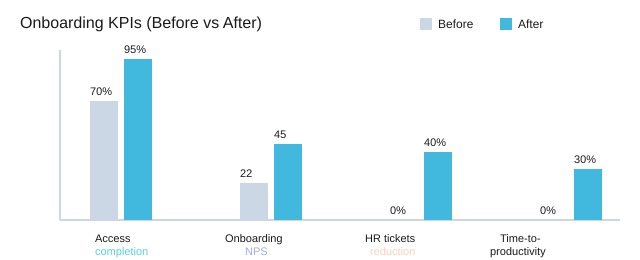
| Time-to-productivity reduction | 30% |
| New hire first-week HR tickets reduced | 40% |
| Day-1 access completion | 70% → 95% |
| Onboarding NPS | 22 → 45 |
4) Customer success stories (and what I steal from them politely)
Leading enterprises transforming: what these signals tell me
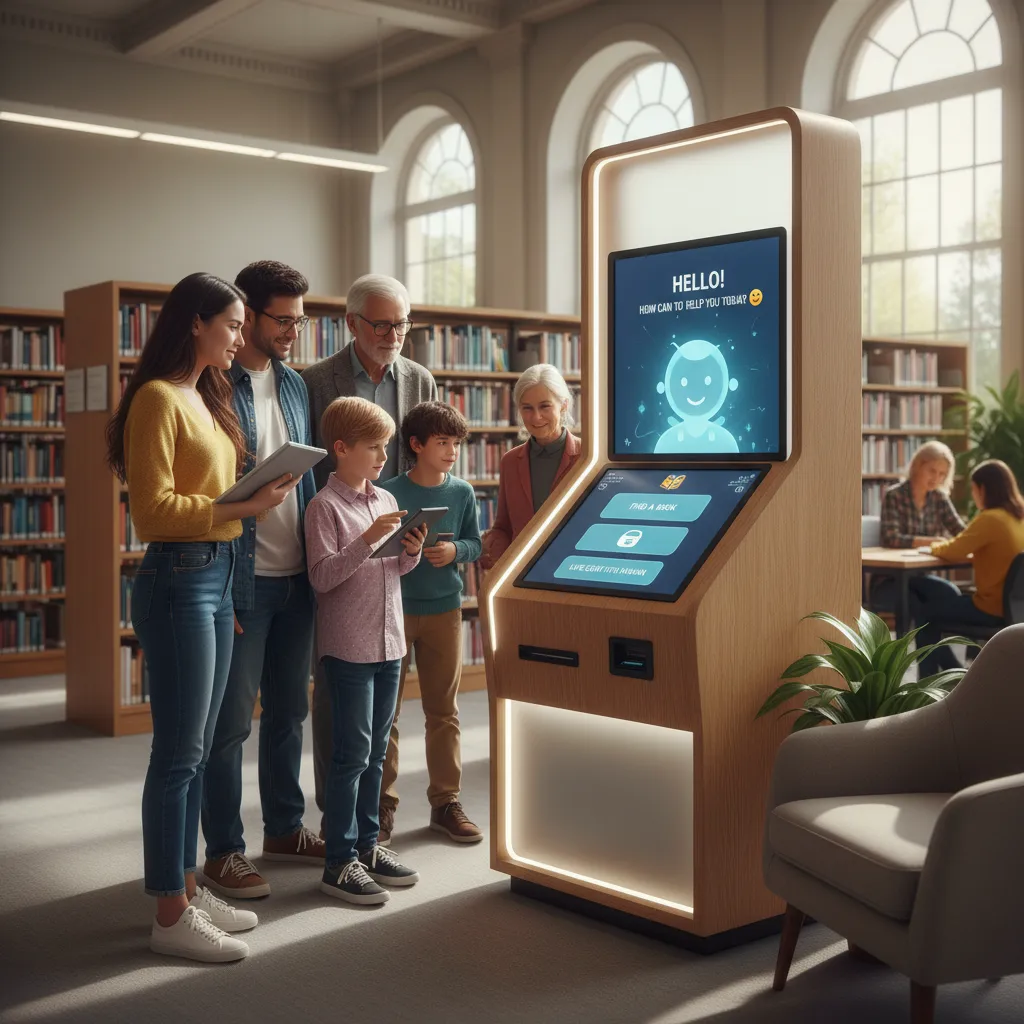
When I read Customer success stories from Moveworks and other real-world enterprise HR transformation examples, I look for patterns, not hype. In the source material (“AI Innovations in HR Operations: Real Results”), leading enterprises transforming HR—like Johnson Controls, Ciena, Databricks, and loanDepot—show a clear adoption signal: they use AI assistants to deflect repetitive HR tickets and push more employees into self-service support. I don’t copy their org chart or tools list. I copy their focus on the work employees actually ask for every day.
Satya Nadella: "The real opportunity of AI is to amplify human capability, not automate it away."
AI operational wins that matter (and why I care)
Across these HR transformation case studies, the “AI operational wins” are practical: fewer tickets, faster resolution, and fewer handoffs between HR, IT, and shared services. In my experience, that’s what makes Enterprise HR Transformation feel real to employees—answers arrive in the flow of work, not after three escalations.
My “copy the pattern, not the org chart” framework
- Start with the top 10 questions (pay, benefits, time off, onboarding).
- Map knowledge ownership (who approves what content, and how often it changes).
- Design for handoffs: AI answers what it can, then routes the rest with context.
- Measure behavior: self-service adoption and ticket deflection, not vanity metrics.
Tiny aside: pilots fail when they ignore permissions and knowledge ownership—people can’t use what they can’t access, and AI can’t answer what no one maintains.
Wild card: CEO wants AI tomorrow—my 30-day pilot I can defend
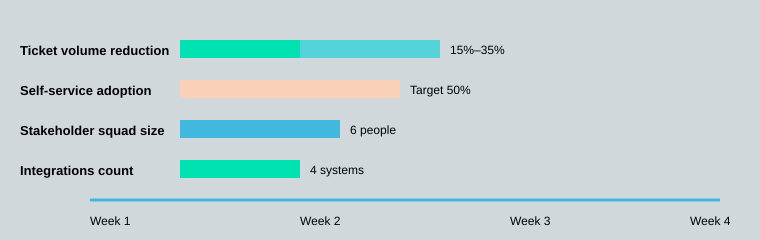
I propose a 30-day pilot with Cross-functional teams (HR + IT + security + comms) so we can ship safely and communicate clearly.
| Pilot item | Plan |
|---|---|
| Pilot timeline | 30 days |
| Systems to integrate (typical) | HRIS, knowledge base, ticketing, collaboration tools |
| Stakeholders per pilot squad | 6 (HR Ops, IT, Security, Comms, People Analytics, HRBP) |
| Target ticket volume reduction (directional) | 15%–35% |
| Self-service adoption target | 50% of repetitive questions |
5) Measurable results industries: People intelligence and predictive insights (hello, 2026)
Why 2026 feels different: boards want People intelligence, not nicer chatbots
In the source material, AI Innovations in HR Operations: Real Results, the big shift is clear: in 2026, leaders are no longer impressed by “AI that answers questions.” Boards are asking me for People intelligence that shows Measurable results industries can defend—especially around Talent risks, skill gaps, and productivity forecasting. That’s where Predictive insights move from “interesting” to “required.”
Jeanne Meister: "People analytics works when it changes a decision—not when it just decorates a slide."
Predictive insights in HR operations: risk, skills, productivity
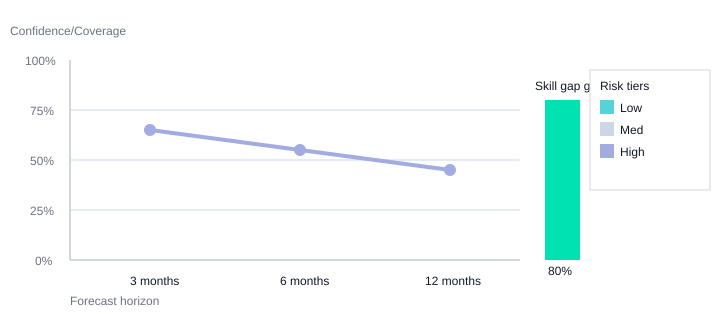
When I build Predictive workforce planning models, I keep the outputs simple enough to act on: attrition risk tiers (Low/Medium/High), skill gap coverage, and forecast horizons (3 months, 6 months, 12 months). The win is not the model—it’s the decision it supports in Workforce planning: where to hire, where to reskill, and where managers need support before performance dips.
Skills-based processes + real-time analytics: stop guessing, start steering
Next-level AI integration is showing up inside management routines and Skills-based processes. I’ve seen teams move their people analytics cadence from monthly → weekly using Real-time analytics. That shift helps HR steer: map critical roles, track skill supply vs. demand, and flag emerging Talent risks early—before they become expensive surprises.
My cautionary note: messy data scales fast
If your data is messy, AI will confidently repeat the mess (ask me how I know). I once built a dashboard everyone loved… until we learned two departments defined “attrition” differently. Governance and data privacy are non-negotiable: clear definitions, access controls, and human review so we keep the human touch in sensitive decisions.
| Metric | 2026 Target |
|---|---|
| Forecast horizons | 3 / 6 / 12 months |
| Skill gap coverage goal | 80% of critical roles mapped |
| Attrition risk tiers | Low / Medium / High |
| People analytics cadence | Monthly → Weekly |
6) Enterprise-grade AI: governance, data privacy, and the “human touch” clause
In my HR digital transformation work, Enterprise-grade AI only earns trust when it is governed like any other core system. The 2026 HR technology trends I track—generative tools, analytics, stronger governance, and maintaining the Human touch—all point to the same lesson: scale comes after control. That’s why I treat our AI innovation platform as part of a unified employee experience, not a side tool.
Enterprise-grade AI checklist (what I require before scale)
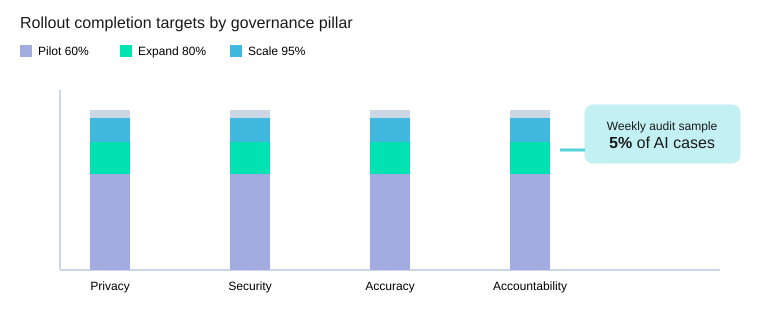
I use four governance pillars—privacy, security, accuracy, and accountability. Practically, that means role-based permissions, audit logs that are easy to review, model oversight (versioning, drift checks, prompt controls), and clear escalation paths when the AI is unsure or an employee disagrees. We also review a 5% audit sample of AI-handled cases each week to catch issues early.
| Item | Value |
|---|---|
| Governance pillars | 4 (privacy, security, accuracy, accountability) |
| Rollout phases | 3 (pilot, expand, scale) |
| Training per HR ops member | 6 hours |
| Reskilling tracks | 2 (automation designer, people analyst) |
| Audit sample rate | 5% of AI-handled cases/week |
Data privacy realities in HR (what I refuse to automate)
Data privacy is where I draw the hardest lines. I won’t fully automate decisions tied to medical details, sensitive employee relations, or final disciplinary outcomes. AI can summarize policies or draft options, but a person must validate context and intent.
Simple decision matrix: automate vs keep human
Automate when the task is repeatable, low-risk, and explainable (status updates, document routing, FAQ answers). Keep human when stakes are high, emotions are involved, or fairness is hard to prove (performance disputes, accommodations, investigations). Hybrid when AI prepares and a human approves (offer letters, job descriptions, case triage).
Change management and workforce reskilling (so AI doesn’t become shelfware)
Good change management is training, clear comms, and job redesign. I plan three phases—pilot (60%), expand (80%), scale (95%)—and I budget 6 hours of training per HR ops member. For workforce reskilling, I build two tracks: automation designer (builds workflows) and people analyst (turns analytics into action). Cultural readiness matters as much as the model.
Patty McCord: "The point of a policy is to enable good judgment, not replace it."
My tiny philosophy corner: HR transformation should feel like better hospitality, not surveillance. When employees feel respected, the unified experience becomes real—and the AI actually gets used.
TL;DR: AI innovations in HR operations deliver real results when they’re aimed at boring-but-painful work: ticket deflection, self-service support, and onboarding automation. The winners pair enterprise-grade AI with governance, data privacy, and a deliberate “human touch” for exceptions. 2026 trends point to boards demanding people intelligence—talent risks, skill gaps, and productivity forecasting—so HR teams should invest now in analytics, reskilling, and change management.


Comments
Post a Comment