AI Content Strategy: Scale Fast, Keep Quality

I learned the hard way that “more content” isn’t the same as “more impact.” A few months ago I proudly scheduled a batch of AI-assisted posts—then watched two things happen: our tone drifted, and support tickets spiked because one article oversimplified a feature. That tiny mess turned into a useful rule for me: scaling is a systems problem, not a writing problem. In this outline I’m sharing the system I now use—part guardrails, part creativity—so AI drafts help me move faster without letting quality quietly leak out the sides.
1) Content Goals That Don’t Lie (Content Strategy)
I start every AI Content Strategy with one uncomfortable question: “What would make this content a failure?” Most of the time, the answer is vague Content Goals like “grow awareness” or “get more traffic.” Vanity traffic felt good—until I had to explain it in a budget meeting.
“If you can’t name the decision your content is meant to change, you don’t have a strategy—you have output.” — Ann Handley
Translate Content Goals into Measurable Outcomes
My content strategy framework is simple: map each goal to Measurable Outcomes and pick the Success Metrics that prove it. I use intent alignment so TOF vs MOF vs BOF content isn’t judged by the same yardstick:
- TOF (top-of-funnel): optimize for engagement rate, brand mentions, and cross-channel engagement depth (saves, shares, email clicks).
- MOF (mid-funnel): optimize for conversion rate to demo/trial, assisted pipeline, and return visits.
- BOF (bottom-funnel): optimize for conversions, sales-assisted influence, and reduced support load (fewer “which plan?” tickets).
“Metrics are not the enemy of creativity; they’re the boundary that makes creative work repeatable.” — Rand Fishkin
Pick 1–2 primary success metrics per stream
If every piece is judged on everything, teams optimize for nothing. I assign one primary metric and one secondary metric per stream, then I write the goal at the top of every brief in plain English—no dashboards allowed.
Goal: Increase qualified demo requests from BOF comparisons by improving conversion rate from 0.6% to 1.0%.
Set a baseline before scaling
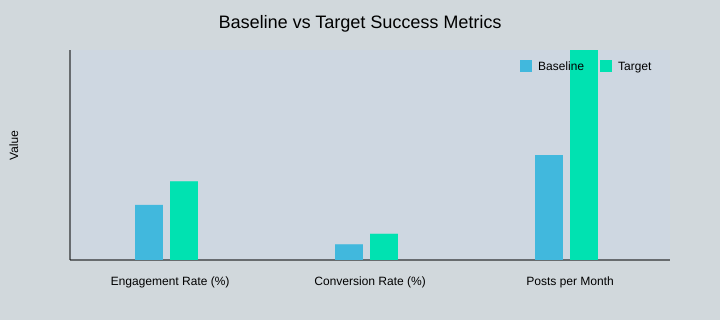
Before I double output, I document the current publishing cadence and current performance. Example baseline vs target:
| Stream | Goal | Metric | Measurement method | Owner |
|---|---|---|---|---|
| TOF pages | Higher quality reach | Engagement rate: 2.1% → 3.0% | GA4 + scroll/click tracking | Content lead |
| MOF product explainers | More intent capture | Conversion rate: 0.6% → 1.0% | CRM + form attribution | Growth marketer |
| BOF comparisons | Reduce friction | Support ticket deflection: -10%/quarter | Helpdesk tags + search logs | Support ops |
| All streams | Scale output | Cadence: 4 → 8 posts/month | Editorial calendar | Managing editor |
Baseline vs Target Success Metrics (Chart)

2) Audience Segments: Writing for Real People (Not Personas)
When I plan an AI content strategy that can scale, I start with audience segments based on the job-to-be-done, not age, title, or company size. As Clayton Christensen said:
“People don’t buy products; they hire them to make progress.” — Clayton Christensen
My favorite segment is the busy evaluator: someone who needs clarity fast, is comparing options, and will bounce if I don’t answer in the first few lines. This is where answer engines optimization matters. With zero-click results behavior, I write to be quotable—tight definitions, clear steps, and scannable bullets that can be lifted into snippets.
Keyword Intent × Depth: My Simple Intent Matrix
To keep SEO friendly writing aligned with real needs, I map keyword intent against content depth:
- Quick answer: definitions, checklists, FAQs (best for support and zero-click)
- Deep guide: walkthroughs, comparisons, implementation playbooks
I also tag every draft by intent and type (e.g., informational + glossary, commercial + comparison). In Ahrefs, I build topic clusters so each segment gets a clear path: pillar page → supporting articles → FAQs.
Content Streams Keep the Backlog Coherent
Instead of one messy queue, I create content streams per segment:
- Support-led stream: answer-first FAQs with tight H2/H3 headings and bullets for AEO
- Product-led stream: use-case walkthroughs and “how it works” pages
“The best segmentation is empathy with a spreadsheet.” — April Dunford
When my copy starts sounding too polished, I keep one voice note from a customer call open. It’s my reality check for tone and wording.
| Segment | Pains | Preferred format | Distribution channel | Success metric |
|---|---|---|---|---|
| New learner | Confused, needs basics | Glossary, starter guides | Organic search | Time on page |
| Busy evaluator | Short on time, comparing | Comparisons, TL;DR | Search + sales links | Demo clicks |
| Technical implementer | Needs steps, edge cases | Deep guides, docs | Docs hub, GitHub | Activation rate |
| Internal champion | Needs proof + slides | ROI notes, one-pagers | Email, enablement | Stakeholder shares |
Planned content mix by segment: New learner 30%, Busy evaluator 30%, Technical implementer 25%, Internal champion 15%. Intent mix target: Informational 50%, Commercial 35%, Navigational 10%, Support 5%.
<svg width="520" height="260" viewBox="0 0 520 260" xmlns="http://www.w3.org/2000/svg">
  <text x="260" y="24" text-anchor="middle" font-family="Arial" font-size="16" fill="#111">Planned Content Mix by Audience Segment</text>

  <g transform="translate(150,140)">
    <!-- Donut slices (r=80, stroke=26; circumference≈502.65) -->
    <circle r="80" fill="none" stroke="#FBD0B9" stroke-width="26"
            stroke-dasharray="150.80 351.85" stroke-dashoffset="0" transform="rotate(-90)"/>
    <circle r="80" fill="none" stroke="#D1D8DC" stroke-width="26"
            stroke-dasharray="150.80 351.85" stroke-dashoffset="-150.80" transform="rotate(-90)"/>
    <circle r="80" fill="none" stroke="#00E2B1" stroke-width="26"
            stroke-dasharray="125.66 376.99" stroke-dashoffset="-301.59" transform="rotate(-90)"/>
    <circle r="80" fill="none" stroke="#CCD7E6" stroke-width="26"
            stroke-dasharray="75.40 427.25" stroke-dashoffset="-427.25" transform="rotate(-90)"/>

    <circle r="55" fill="#fff"/>
  </g>

  <!-- Labels -->
  <g font-family="Arial" font-size="12" fill="#111">
    <rect x="300" y="70" width="10" height="10" fill="#FBD0B9"/>
    <text x="316" y="79">New learner — 30%</text>

    <rect x="300" y="95" width="10" height="10" fill="#D1D8DC"/>
    <text x="316" y="104">Busy evaluator — 30%</text>

    <rect x="300" y="120" width="10" height="10" fill="#00E2B1"/>
    <text x="316" y="129">Technical implementer — 25%</text>

    <rect x="300" y="145" width="10" height="10" fill="#CCD7E6"/>
    <text x="316" y="154">Internal champion — 15%</text>

    <rect x="300" y="170" width="10" height="10" fill="#54D3DA"/>
    <text x="316" y="179">Reserve color (not used)</text>
  </g>
</svg>
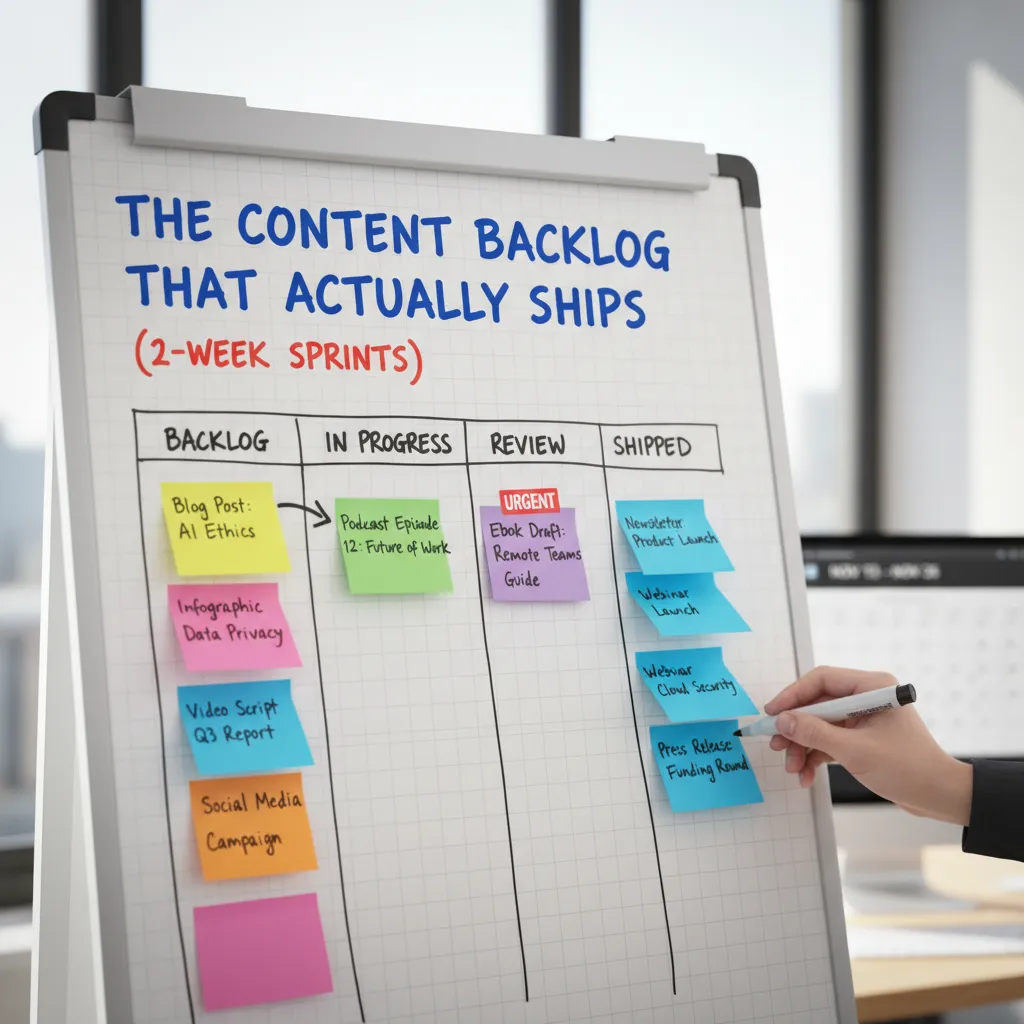
3) The Content Backlog That Actually Ships (2‑Week Sprints)
I treat the Content Backlog like a pantry: if it’s unlabeled, it rots (ideas die). Small confession: my backlog used to be 87 tabs—now it’s one Airtable view. The tool doesn’t matter, but the habit does: every idea gets a title, keyword, owner, and next action so it can move.
“Work expands to fill the time available for its completion.” — C. Northcote Parkinson
My content backlog sprint rhythm (and content cadence)
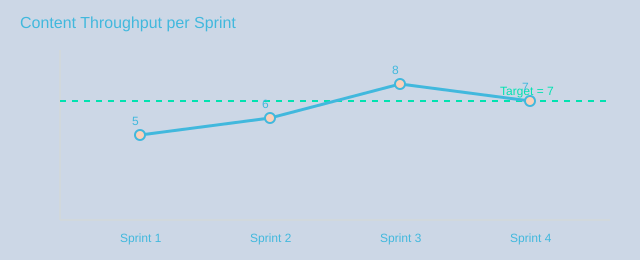
I run 2-week sprints to keep a steady content cadence. Each sprint has a clear capacity, and I reserve 20% for experimentation—new formats, channels, or AEO tests—so we learn without derailing delivery.
| Sprint length | Capacity | Committed items | Experiments (20%) | Owners | Approval SLA |
|---|---|---|---|---|---|
| 2 weeks | 10 content points | 8 | 2 | Marketing + Product + Support | Editor 24h; Product 72h; Legal 5 business days |
Workflow steps (the only ones I trust)
These workflow steps keep AI speed without losing quality:
- Brief
- AI outline
- AI drafts
- Human review
- Publish
- Measure
- Retro
Rapid approvals across marketing, product, and support
Rapid approvals are about deciding what needs review. I label backlog items as Editor-only, Product review, or Legal. Most posts ship with editor approval in 24 hours. Product gets 72 hours for accuracy checks. Legal gets 5 business days, so anything legal-heavy must enter the sprint earlier.
Feedback loops that improve every sprint
I build feedback loops into the retro: what shipped, what stalled, and what we learned from the 20% experiments. I track throughput and cycle time so we don’t just “do more,” we get smoother.
“The way to get better at making things is to make more things—then reflect.” — Austin Kleon

4) Brand Voice + Guardrails Theme: Let AI Drafts, Not Decide
My rule is simple: AI drafts are interns with super speed—useful, but not unsupervised. I use tools like Gemini for prompts, outlines, and first drafts, then I apply human editing to protect quality. This is where brand voice guidelines and a clear Guardrails Theme keep speed from turning into sloppy content.
“Your brand voice is a promise, not a vibe.” — Joana Wiebe
Brand Voice checklist (what I lock before I scale)
- Words we always use (our “signature” terms)
- Words we never use (hype, vague claims, filler)
- Sentence length (short, clear, skimmable)
- Level of certainty (when to say “may” vs “will”)
Wild-card moment: I once made AI write in the voice of my grumpiest professor. It was sharp, cold, and “right” in a technical way—but it revealed what my Brand Voice is not: I don’t want readers to feel judged.
Guardrails Theme: protect factual accuracy and trust
My guardrails focus on factual accuracy, citations, and avoiding “too-good-to-be-true” claims. I also flag risk areas like invented features, fake stats, and confident wording with no source. To build originality signals, I scan top-ranking articles, note what they skip (examples, edge cases, real workflows), and add my own perspective and audit notes.
Human review workflow (3 passes, not 1)
- Structure: does the outline match search intent and flow?
- Factual Accuracy: verify claims, add citations, remove guesses.
- Tone: align with brand voice, simplify, remove hype.
I document decisions in an audit trail (prompt, sources, edits, approver). This is basic AI governance for content marketing and a core part of quality assurance content.
| Item | Data |
|---|---|
| AI usage | prompts → outlines → drafts (Gemini) |
| Human review passes | 3 (structure, factual accuracy, tone) |
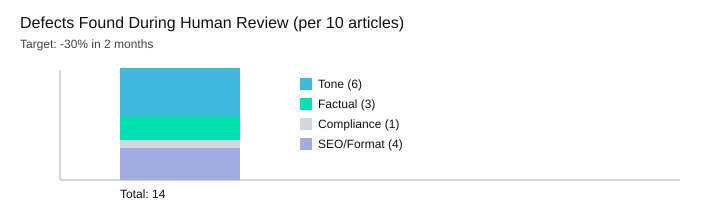
| Defects per 10 articles | Tone 6, Factual 3, Compliance 1, SEO/format 4 |
| Target after guardrails | -30% defects in 2 months |
| Guardrail | Risk | Detection method | Mitigation | Owner |
|---|---|---|---|---|
| Citations required | Unsupported claims | Source checklist | Add/replace sources | Editor |
| No invented features | Misinformation | Product/spec review | Verify or delete | SME |
| No hype claims | Trust loss | Tone scan | Rewrite with proof | Lead |
| Compliance check | Legal issues | Policy checklist | Approve/adjust | Compliance |
“Quality is the result of a million small decisions made consistently.” — Ben Horowitz
5) AEO Content + Entity First Strategy (Write for Answer Engines)
If you asked me over coffee how to scale content without losing quality, I’d say this: write the answer first, then earn the deep dive. That’s the heart of AEO Content and AEO Optimization. When I do this well, I win Zero Click Results and still pull readers into the full page.
“Clarity is the currency of the internet.” — Emily Ley
“Write to be understood, not to be impressive.” — David Perell
AEO content: answer-first structure with clear headings
For Answer Engines, I structure pages so the first 5 lines deliver a clean, direct answer. Then I expand with Clear Headings and Bullet Points so AI systems can extract the best parts without guessing.
- H3 = the question I’m answering
- First paragraph = 40-word answer (my favorite experiment)
- Bullets = steps, definitions, and comparisons
When I rewrite intros as a 40-word answer and then expand, my bounce rate usually thanks me.
Entity first strategy: build entity understanding early
An entity first strategy means I define the who, what, and how it connects near the top. This improves Entity Understanding for both humans and machines.
- Who: brand, product, person, or concept
- What: simple definition + key attributes
- Connections: related terms, use cases, and competitors
I map these connections into topic clusters SEO using Ahrefs, then link each cluster back to a core entity page.
Track answer engines optimization with AEO KPIs
| AEO KPI | Definition | Tool/Source | Target |
|---|---|---|---|
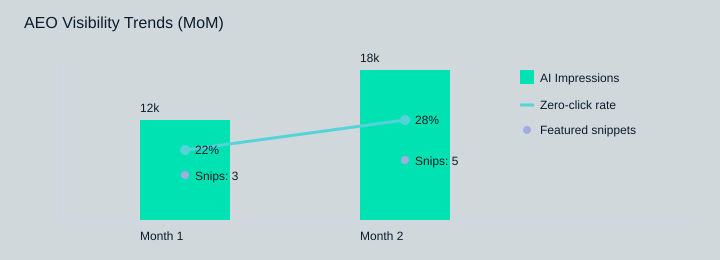
| AI impressions | How often AI surfaces your content | GSC + platform analytics | 12k→18k (+50%) |
| Featured snippets | Snippets you own in SERPs | Ahrefs/SEMrush | 3→5 (+2) |
| Zero-click visibility | Views without a click | GSC + SERP features | 22%→28% (+6 pp) |
| Cluster cadence | New TOF page output | Content calendar | 1 new TOF page/month |
Visibility sources: organic clicks vs zero-click/AI impressions
6) Feedback Loops: The Part Everyone Skips (and Regrets)
I scale AI content without losing quality by treating feedback loops like production, not “nice to have.” I schedule a 30-minute retro every two weeks—non-negotiable, even when we’re “busy.” That meeting is where marketing, product, and support align on fast approvals and clear handoffs, so we don’t ship content that creates tickets, confusion, or rework.
Posting Performance: what won, what flopped, what confused readers
In each retro, I run a simple posting performance review: what earned clicks and trust, what fell flat, and what confused readers. I pull comments, on-page behavior, and support logs (weekly) to spot repeated questions. I also check analytics (weekly) and sales notes (monthly) to see which topics help real conversations. This is where success metrics KPIs get real: not just traffic, but engagement rate, conversions, and deeper signals like AI summaries visibility, brand mentions, and cross-channel engagement depth.
“The most valuable feedback is the kind you can act on Monday.” — Teresa Torres
Audit Trail + quality assurance content (without slowing down)
I keep a tiny “editor’s changelog” as an audit trail lite: what we changed, why, and who approved it. This supports quality assurance content and makes AI governance practical. We audit processes, select tools, and document rules (sources required, claims verified, tone checks) so approvals stay rapid and consistent.
| Feedback source | Signal | Action | Owner | Cadence |
|---|---|---|---|---|
| Analytics | Drop in engagement rate | Rewrite intro + add clearer CTA | Marketing | Weekly |
| Support logs | Repeated “how do I…” | Add steps + screenshots | Support + Content | Weekly |
| Sales notes | Objection patterns | Create comparison section | Sales + Product | Monthly |
| Retro | Process bottleneck | Update workflow + approvals | All teams | Every 2 weeks |
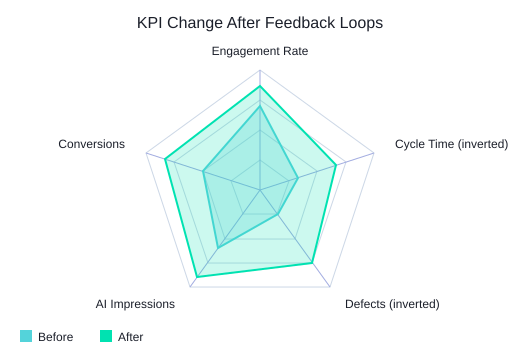
Targets after 6 weeks: Engagement rate +0.5 pp, Defects -30%, Cycle time -20%. Example (illustrative): Engagement 2.1%→2.6%; Cycle time 10→8 days; Defects per 10 articles 14→10.
“Without reflection, we keep making the same content with different headlines.” — Andy Crestodina
I turn every insight into backlog rules—my favorite is: “If it can’t be verified, it can’t be published.” That’s the real ending to scaling: quality doesn’t scale by wishing; it scales by loops.
TL;DR: I scale with an AI content strategy by (1) setting content goals tied to success metrics, (2) building a prioritized content backlog in 2‑week sprints, (3) using AI drafts inside strict brand voice + factual accuracy guardrails, (4) optimizing for answer engines with clear headings and entity-first structure, and (5) closing the loop with feedback loops and an audit trail.


Comments
Post a Comment